🔤 Text Formatting
Fonts, sizes, colours, multi-line blocks, and fine-grained text control.
Text Formatting
using ObviousPDF;
using ObviousPDF.Accessibility;
using ObviousPDF.Fonts;

var doc = new PdfDocument();
doc.Info.Title = "Text Formatting";
doc.Language = "en-US";
doc.DisplayDocTitle = true;
var root = doc.EnableTaggedPdf();
var page = doc.AddPage();

var h1 = root.AddChild(StructureType.H1);
page.AddTaggedText(h1, "Text Formatting", 72, 740,
    new PdfTextOptions { Font = StandardFont.HelveticaBold, FontSize = 24 });

var p1 = root.AddChild(StructureType.P);
page.AddTaggedText(p1, "Helvetica (Sans)", 72, 700,
    new PdfTextOptions { Font = StandardFont.Helvetica, FontSize = 14 });
var p2 = root.AddChild(StructureType.P);
page.AddTaggedText(p2, "Times Roman (Serif)", 72, 680,
    new PdfTextOptions { Font = StandardFont.TimesRoman, FontSize = 14 });

var pRed = root.AddChild(StructureType.P);
page.AddTaggedText(pRed, "Red warning text", 72, 640,
    new PdfTextOptions
    {
        Color = PdfColor.FromRgb(0.85, 0.1, 0.1),
        Font = StandardFont.HelveticaBold, FontSize = 14
    });

var pBlock = root.AddChild(StructureType.P);
page.AddTaggedTextBlock(pBlock, new[]
{
    "This is a multi-line text block.",
    "Each line advances automatically.",
    "Leading controls vertical spacing."
}, 72, 580, new PdfTextOptions { FontSize = 12, Leading = 18 });

var pMix = root.AddChild(StructureType.P);
page.BeginTaggedContent(pMix);
page.BeginTextBlock()
    .SetFont(StandardFont.Helvetica, 14)
    .MoveTextTo(72, 500)
    .ShowText("Normal, ")
    .SetFont(StandardFont.HelveticaBold, 14)
    .ShowText("bold, ")
    .SetFont(StandardFont.HelveticaOblique, 14)
    .ShowText("italic")
    .EndTextBlock();
page.EndTaggedContent();

var pLeft = root.AddChild(StructureType.P);
page.AddTaggedText(pLeft, "Left-aligned (default)", 72, 440,
    new PdfTextOptions { FontSize = 13, Alignment = PdfTextAlignment.Left, Width = 468 });

var pCenter = root.AddChild(StructureType.P);
pCenter.TextAlign = PdfLayoutTextAlign.Center;
page.AddTaggedText(pCenter, "Center-aligned text", 72, 415,
    new PdfTextOptions { FontSize = 13, Alignment = PdfTextAlignment.Center, Width = 468 });

var pRight = root.AddChild(StructureType.P);
pRight.TextAlign = PdfLayoutTextAlign.End;
page.AddTaggedText(pRight, "Right-aligned text", 72, 390,
    new PdfTextOptions { FontSize = 13, Alignment = PdfTextAlignment.Right, Width = 468 });

doc.Save("text_formatting.pdf");
Imports ObviousPDF
Imports ObviousPDF.Accessibility
Imports ObviousPDF.Fonts
Dim doc As New PdfDocument()
doc.Info.Title = "Text Formatting"
doc.Language = "en-US"
doc.DisplayDocTitle = True
Dim root = doc.EnableTaggedPdf()
Dim page = doc.AddPage()
Dim h1 = root.AddChild(StructureType.H1)
page.AddTaggedText(h1, "Text Formatting", 72, 740,
New PdfTextOptions With { .Font = StandardFont.HelveticaBold, .FontSize = 24 })
Dim p1 = root.AddChild(StructureType.P)
page.AddTaggedText(p1, "Helvetica (Sans)", 72, 700,
New PdfTextOptions With { .Font = StandardFont.Helvetica, .FontSize = 14 })
Dim p2 = root.AddChild(StructureType.P)
page.AddTaggedText(p2, "Times Roman (Serif)", 72, 680,
New PdfTextOptions With { .Font = StandardFont.TimesRoman, .FontSize = 14 })
Dim pRed = root.AddChild(StructureType.P)
page.AddTaggedText(pRed, "Red warning text", 72, 640,
New PdfTextOptions With {
.Color = PdfColor.FromRgb(0.85, 0.1, 0.1),
.Font = StandardFont.HelveticaBold, .FontSize = 14
})
Dim pBlock = root.AddChild(StructureType.P)
page.AddTaggedTextBlock(pBlock, New String() {
"This is a multi-line text block.",
"Each line advances automatically.",
"Leading controls vertical spacing."
}, 72, 580, New PdfTextOptions With { .FontSize = 12, .Leading = 18 })
Dim pMix = root.AddChild(StructureType.P)
page.BeginTaggedContent(pMix)
page.BeginTextBlock() _
.SetFont(StandardFont.Helvetica, 14) _
.MoveTextTo(72, 500) _
.ShowText("Normal, ") _
.SetFont(StandardFont.HelveticaBold, 14) _
.ShowText("bold, ") _
.SetFont(StandardFont.HelveticaOblique, 14) _
.ShowText("italic") _
.EndTextBlock()
page.EndTaggedContent()
Dim pLeft = root.AddChild(StructureType.P)
page.AddTaggedText(pLeft, "Left-aligned (default)", 72, 440,
New PdfTextOptions With { .FontSize = 13, .Alignment = PdfTextAlignment.Left, .Width = 468 })
Dim pCenter = root.AddChild(StructureType.P)
pCenter.TextAlign = PdfLayoutTextAlign.Center
page.AddTaggedText(pCenter, "Center-aligned text", 72, 415,
New PdfTextOptions With { .FontSize = 13, .Alignment = PdfTextAlignment.Center, .Width = 468 })
Dim pRight = root.AddChild(StructureType.P)
pRight.TextAlign = PdfLayoutTextAlign.End
page.AddTaggedText(pRight, "Right-aligned text", 72, 390,
New PdfTextOptions With { .FontSize = 13, .Alignment = PdfTextAlignment.Right, .Width = 468 })
doc.Save("text_formatting.pdf")open ObviousPDF
open ObviousPDF.Accessibility
open ObviousPDF.Fonts
let doc = PdfDocument()
doc.Info.Title <- "Text Formatting"
doc.Language <- "en-US"
doc.DisplayDocTitle <- true
let root = doc.EnableTaggedPdf()
let page = doc.AddPage()
let h1 = root.AddChild(StructureType.H1)
let h1O = PdfTextOptions(Font = StandardFont.HelveticaBold, FontSize = 24.0)
page.AddTaggedText(h1, "Text Formatting", 72.0, 740.0, h1O)
let p1 = root.AddChild(StructureType.P)
page.AddTaggedText(p1, "Helvetica (Sans)", 72.0, 700.0,
PdfTextOptions(Font = StandardFont.Helvetica, FontSize = 14.0))
let p2 = root.AddChild(StructureType.P)
page.AddTaggedText(p2, "Times Roman (Serif)", 72.0, 680.0,
PdfTextOptions(Font = StandardFont.TimesRoman, FontSize = 14.0))
let pRed = root.AddChild(StructureType.P)
let redO = PdfTextOptions()
redO.Color <- PdfColor.FromRgb(0.85, 0.1, 0.1)
redO.Font <- StandardFont.HelveticaBold
redO.FontSize <- 14.0
page.AddTaggedText(pRed, "Red warning text", 72.0, 640.0, redO)
let pBlock = root.AddChild(StructureType.P)
let blkO = PdfTextOptions(FontSize = 12.0, Leading = 18.0)
page.AddTaggedTextBlock(pBlock, [|
"This is a multi-line text block."
"Each line advances automatically."
"Leading controls vertical spacing."
|], 72.0, 580.0, blkO)
let pMix = root.AddChild(StructureType.P)
page.BeginTaggedContent(pMix)
page.BeginTextBlock()
.SetFont(StandardFont.Helvetica, 14.0)
.MoveTextTo(72.0, 500.0)
.ShowText("Normal, ")
.SetFont(StandardFont.HelveticaBold, 14.0)
.ShowText("bold, ")
.SetFont(StandardFont.HelveticaOblique, 14.0)
.ShowText("italic")
.EndTextBlock() |> ignore
page.EndTaggedContent()
let pLeft = root.AddChild(StructureType.P)
let lO = PdfTextOptions(FontSize = 13.0, Alignment = PdfTextAlignment.Left, Width = 468.0)
page.AddTaggedText(pLeft, "Left-aligned (default)", 72.0, 440.0, lO)
let pCenter = root.AddChild(StructureType.P)
pCenter.TextAlign <- PdfLayoutTextAlign.Center
let cO = PdfTextOptions(FontSize = 13.0, Alignment = PdfTextAlignment.Center, Width = 468.0)
page.AddTaggedText(pCenter, "Center-aligned text", 72.0, 415.0, cO)
let pRight = root.AddChild(StructureType.P)
pRight.TextAlign <- PdfLayoutTextAlign.End
let rO = PdfTextOptions(FontSize = 13.0, Alignment = PdfTextAlignment.Right, Width = 468.0)
page.AddTaggedText(pRight, "Right-aligned text", 72.0, 390.0, rO)
doc.Save("text_formatting.pdf")Add-Type -Path "ObviousPDF.dll"
$doc = [ObviousPDF.PdfDocument]::new()
$doc.Info.Title = "Text Formatting"
$doc.Language = "en-US"
$doc.DisplayDocTitle = $true
$root = $doc.EnableTaggedPdf()
$page = $doc.AddPage()
# Bold heading
$h1 = $root.AddChild([ObviousPDF.Accessibility.StructureType]::H1)
$opts = [ObviousPDF.PdfTextOptions]::new()
$opts.Font = [ObviousPDF.Fonts.StandardFont]::HelveticaBold
$opts.FontSize = 24
$page.AddTaggedText($h1, "Text Formatting", 72, 740, $opts)
# Coloured text
$pRed = $root.AddChild([ObviousPDF.Accessibility.StructureType]::P)
$opts = [ObviousPDF.PdfTextOptions]::new()
$opts.Color = [ObviousPDF.PdfColor]::FromRgb(0.85, 0.1, 0.1)
$opts.Font = [ObviousPDF.Fonts.StandardFont]::HelveticaBold
$opts.FontSize = 14
$page.AddTaggedText($pRed, "Red warning text", 72, 640, $opts)
# Center alignment
$pCenter = $root.AddChild([ObviousPDF.Accessibility.StructureType]::P)
$pCenter.TextAlign = [ObviousPDF.Accessibility.PdfLayoutTextAlign]::Center
$opts = [ObviousPDF.PdfTextOptions]::new()
$opts.FontSize = 13
$opts.Alignment = [ObviousPDF.PdfTextAlignment]::Center
$opts.Width = 468
$page.AddTaggedText($pCenter, "Center-aligned text", 72, 415, $opts)
$doc.Save("text_formatting.pdf")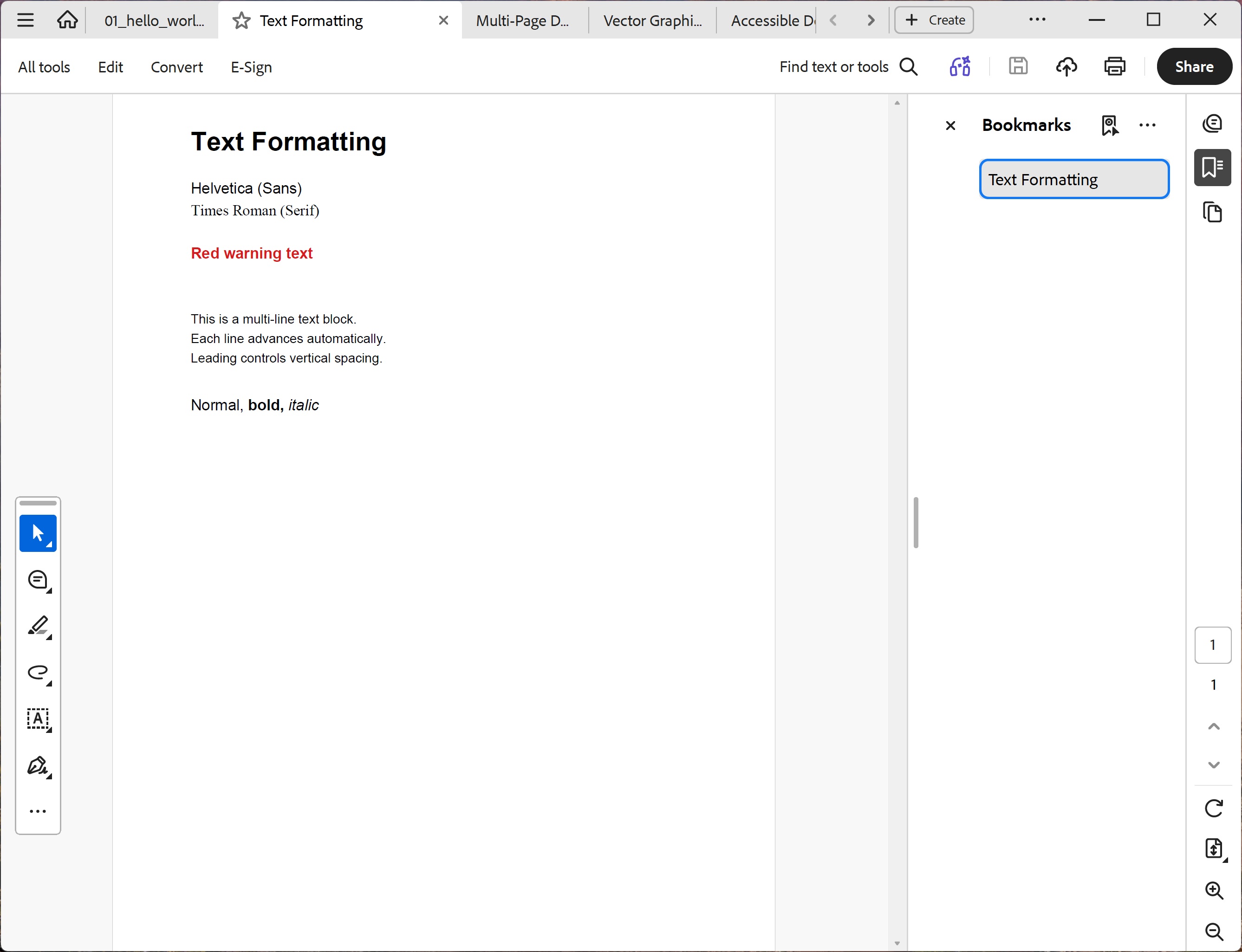
You should see a bold 24 pt heading, font-family samples in Helvetica and Times Roman, red warning text, a three-line paragraph with generous spacing, a mixed-style line reading "Normal, bold, italic", and three lines demonstrating left, center, and right alignment within a 468-point text box.
File: 02_text_formatting.pdf
📐 Text Alignment
Set Alignment and Width on PdfTextOptions to control horizontal text positioning within a box. Alignment is only active when Width is set.
| Alignment | Description |
|---|---|
PdfTextAlignment.Left | Default — text starts at the given x position |
PdfTextAlignment.Center | Text is centered within the width box |
PdfTextAlignment.Right | Text is right-aligned within the width box |
PdfTextAlignment.Justify | Text is spread across the full width via word spacing (ISO 32000-2 §9.3.3 Tw operator) |
Available Fonts
| Font | Style | Embedded Substitute |
|---|---|---|
Helvetica | Sans-serif | Sora Regular (SIL OFL) |
HelveticaBold | Sans-serif bold | Sora Bold |
TimesRoman | Serif | CMU Serif Roman |
Courier | Monospace | CMU Typewriter |
🎨 Rich Text — Mixed Inline Styles
Combine bold, italic, colour, underline, strikethrough, superscript, and subscript in a single line using AddRichText / AddTaggedRichText.
Rich Text — Mixed Inline Styles
using ObviousPDF;
using ObviousPDF.Accessibility;
using ObviousPDF.Fonts;

var doc = new PdfDocument();
doc.Info.Title = "Rich Text Example";
doc.Language = "en-US";
doc.DisplayDocTitle = true;
var root = doc.EnableTaggedPdf();
var page = doc.AddPage();

var h1 = root.AddChild(StructureType.H1);
page.AddTaggedText(h1, "Rich Text Formatting", 72, 740,
    new PdfTextOptions { EmbeddedFont = BundledFonts.SansBold, FontSize = 22 });

// Base options shared across all runs
var baseOpts = new PdfTextOptions { EmbeddedFont = BundledFonts.SansRegular, FontSize = 14 };

// Line 1 — bold, italic, colour
var pLine1 = root.AddChild(StructureType.P);
page.AddTaggedRichText(pLine1, new[]
{
    new PdfRichTextRun { Text = "Normal  " },
    new PdfRichTextRun { Text = "Bold  ",
        Options = new PdfTextOptions { EmbeddedFont = BundledFonts.SansBold, FontSize = 14 } },
    new PdfRichTextRun { Text = "Italic  ",
        Options = new PdfTextOptions { EmbeddedFont = BundledFonts.SansItalic, FontSize = 14 } },
    new PdfRichTextRun { Text = "Red  ",
        Options = new PdfTextOptions { Color = PdfColor.Red, FontSize = 14 } },
    new PdfRichTextRun { Text = "Blue",
        Options = new PdfTextOptions { Color = PdfColor.Blue, FontSize = 14 } },
}, 72, 700, baseOpts);

// Line 2 — underline and strikethrough
var pLine2 = root.AddChild(StructureType.P);
page.AddTaggedRichText(pLine2, new[]
{
    new PdfRichTextRun { Text = "Underline  ",
        Options = new PdfTextOptions { FontSize = 14,
            Decoration = PdfTextDecoration.Underline } },
    new PdfRichTextRun { Text = "Strikethrough",
        Options = new PdfTextOptions { FontSize = 14,
            Decoration = PdfTextDecoration.Strikethrough } },
}, 72, 670, baseOpts);

// Line 3 — superscript and subscript
var pLine3 = root.AddChild(StructureType.P);
page.AddTaggedRichText(pLine3, new[]
{
    new PdfRichTextRun { Text = "H" },
    new PdfRichTextRun { Text = "2",
        Options = new PdfTextOptions { FontSize = 9, Subscript = true } },
    new PdfRichTextRun { Text = "O  is water.   E = mc" },
    new PdfRichTextRun { Text = "2",
        Options = new PdfTextOptions { FontSize = 9, Superscript = true } },
}, 72, 640, baseOpts);

doc.Save("rich_text.pdf");
Imports ObviousPDF
Imports ObviousPDF.Accessibility
Imports ObviousPDF.Fonts
Dim doc As New PdfDocument()
doc.Info.Title = "Rich Text Example"
doc.Language = "en-US"
doc.DisplayDocTitle = True
Dim root = doc.EnableTaggedPdf()
Dim page = doc.AddPage()
Dim h1 = root.AddChild(StructureType.H1)
page.AddTaggedText(h1, "Rich Text Formatting", 72, 740,
New PdfTextOptions With { .EmbeddedFont = BundledFonts.SansBold, .FontSize = 22 })
Dim baseOpts = New PdfTextOptions With { .EmbeddedFont = BundledFonts.SansRegular, .FontSize = 14 }
Dim pLine1 = root.AddChild(StructureType.P)
page.AddTaggedRichText(pLine1, New PdfRichTextRun() {
New PdfRichTextRun With { .Text = "Normal " },
New PdfRichTextRun With { .Text = "Bold ",
.Options = New PdfTextOptions With { .EmbeddedFont = BundledFonts.SansBold, .FontSize = 14 } },
New PdfRichTextRun With { .Text = "Italic ",
.Options = New PdfTextOptions With { .EmbeddedFont = BundledFonts.SansItalic, .FontSize = 14 } },
New PdfRichTextRun With { .Text = "Red",
.Options = New PdfTextOptions With { .Color = PdfColor.Red, .FontSize = 14 } }
}, 72, 700, baseOpts)
Dim pLine2 = root.AddChild(StructureType.P)
page.AddTaggedRichText(pLine2, New PdfRichTextRun() {
New PdfRichTextRun With { .Text = "Underline ",
.Options = New PdfTextOptions With { .FontSize = 14, .Decoration = PdfTextDecoration.Underline } },
New PdfRichTextRun With { .Text = "Strikethrough",
.Options = New PdfTextOptions With { .FontSize = 14, .Decoration = PdfTextDecoration.Strikethrough } }
}, 72, 670, baseOpts)
Dim pLine3 = root.AddChild(StructureType.P)
page.AddTaggedRichText(pLine3, New PdfRichTextRun() {
New PdfRichTextRun With { .Text = "H" },
New PdfRichTextRun With { .Text = "2",
.Options = New PdfTextOptions With { .FontSize = 9, .Subscript = True } },
New PdfRichTextRun With { .Text = "O is water. E = mc" },
New PdfRichTextRun With { .Text = "2",
.Options = New PdfTextOptions With { .FontSize = 9, .Superscript = True } }
}, 72, 640, baseOpts)
doc.Save("rich_text.pdf")open ObviousPDF
open ObviousPDF.Accessibility
open ObviousPDF.Fonts
let doc = PdfDocument()
doc.Info.Title <- "Rich Text Example"
doc.Language <- "en-US"
doc.DisplayDocTitle <- true
let root = doc.EnableTaggedPdf()
let page = doc.AddPage()
let h1 = root.AddChild(StructureType.H1)
page.AddTaggedText(h1, "Rich Text Formatting", 72.0, 740.0,
PdfTextOptions(EmbeddedFont = BundledFonts.SansBold, FontSize = 22.0))
let baseOpts = PdfTextOptions(EmbeddedFont = BundledFonts.SansRegular, FontSize = 14.0)
let pLine1 = root.AddChild(StructureType.P)
page.AddTaggedRichText(pLine1, [|
PdfRichTextRun(Text = "Normal ")
PdfRichTextRun(Text = "Bold ",
Options = PdfTextOptions(EmbeddedFont = BundledFonts.SansBold, FontSize = 14.0))
PdfRichTextRun(Text = "Italic ",
Options = PdfTextOptions(EmbeddedFont = BundledFonts.SansItalic, FontSize = 14.0))
PdfRichTextRun(Text = "Red",
Options = PdfTextOptions(Color = PdfColor.Red, FontSize = 14.0))
|], 72.0, 700.0, baseOpts)
let pLine2 = root.AddChild(StructureType.P)
page.AddTaggedRichText(pLine2, [|
PdfRichTextRun(Text = "Underline ",
Options = PdfTextOptions(FontSize = 14.0, Decoration = PdfTextDecoration.Underline))
PdfRichTextRun(Text = "Strikethrough",
Options = PdfTextOptions(FontSize = 14.0, Decoration = PdfTextDecoration.Strikethrough))
|], 72.0, 670.0, baseOpts)
let pLine3 = root.AddChild(StructureType.P)
page.AddTaggedRichText(pLine3, [|
PdfRichTextRun(Text = "H")
PdfRichTextRun(Text = "2",
Options = PdfTextOptions(FontSize = 9.0, Subscript = true))
PdfRichTextRun(Text = "O is water. E = mc")
PdfRichTextRun(Text = "2",
Options = PdfTextOptions(FontSize = 9.0, Superscript = true))
|], 72.0, 640.0, baseOpts)
doc.Save("rich_text.pdf")Add-Type -Path "ObviousPDF.dll"
$doc = [ObviousPDF.PdfDocument]::new()
$doc.Info.Title = "Rich Text Example"
$doc.Language = "en-US"
$doc.DisplayDocTitle = $true
$root = $doc.EnableTaggedPdf()
$page = $doc.AddPage()
$h1 = $root.AddChild([ObviousPDF.Accessibility.StructureType]::H1)
$page.AddTaggedText($h1, "Rich Text Formatting", 72, 740,
[ObviousPDF.PdfTextOptions]@{ EmbeddedFont = [ObviousPDF.Fonts.BundledFonts]::SansBold; FontSize = 22 })
$baseOpts = [ObviousPDF.PdfTextOptions]@{
EmbeddedFont = [ObviousPDF.Fonts.BundledFonts]::SansRegular; FontSize = 14 }
$pLine1 = $root.AddChild([ObviousPDF.Accessibility.StructureType]::P)
$runs1 = @(
[ObviousPDF.PdfRichTextRun]@{ Text = "Normal " },
[ObviousPDF.PdfRichTextRun]@{ Text = "Bold ";
Options = [ObviousPDF.PdfTextOptions]@{ EmbeddedFont = [ObviousPDF.Fonts.BundledFonts]::SansBold; FontSize = 14 } },
[ObviousPDF.PdfRichTextRun]@{ Text = "Italic ";
Options = [ObviousPDF.PdfTextOptions]@{ EmbeddedFont = [ObviousPDF.Fonts.BundledFonts]::SansItalic; FontSize = 14 } },
[ObviousPDF.PdfRichTextRun]@{ Text = "Red";
Options = [ObviousPDF.PdfTextOptions]@{ Color = [ObviousPDF.PdfColor]::Red; FontSize = 14 } }
)
$page.AddTaggedRichText($pLine1, $runs1, 72, 700, $baseOpts)
$pLine2 = $root.AddChild([ObviousPDF.Accessibility.StructureType]::P)
$runs2 = @(
[ObviousPDF.PdfRichTextRun]@{ Text = "Underline ";
Options = [ObviousPDF.PdfTextOptions]@{ FontSize = 14;
Decoration = [ObviousPDF.PdfTextDecoration]::Underline } },
[ObviousPDF.PdfRichTextRun]@{ Text = "Strikethrough";
Options = [ObviousPDF.PdfTextOptions]@{ FontSize = 14;
Decoration = [ObviousPDF.PdfTextDecoration]::Strikethrough } }
)
$page.AddTaggedRichText($pLine2, $runs2, 72, 670, $baseOpts)
$doc.Save("rich_text.pdf")PdfRichTextRun Properties
| Property | Type | Description |
|---|---|---|
Text | string | The text content of this run |
Options | PdfTextOptions? | Style overrides for this run. Any property not set falls back to the base options passed to AddRichText. |
Options.EmbeddedFont | BundledFonts | Font variant — SansRegular, SansBold, SansItalic, etc. |
Options.Color | PdfColor | Text colour — e.g. PdfColor.Red, PdfColor.Blue, PdfColor.FromRgb(...) |
Options.Decoration | PdfTextDecoration | Underline or Strikethrough |
Options.Superscript | bool | Raises and reduces text for superscript (e.g. E = mc²) |
Options.Subscript | bool | Lowers and reduces text for subscript (e.g. H₂O) |
Options.FontSize | double | Override point size for this run only |