🎭 Colour Spaces
RGB, CMYK, and grayscale colour spaces for screen and print workflows.
Colour Spaces
using ObviousPDF;
using ObviousPDF.Accessibility;
using ObviousPDF.Fonts;

var doc = new PdfDocument();
doc.Info.Title = "Colour Spaces";
doc.Language = "en-US";
doc.DisplayDocTitle = true;
var root = doc.EnableTaggedPdf();
var page = doc.AddPage();

var h1 = root.AddChild(StructureType.H1);
page.AddTaggedText(h1, "Colour Spaces", 72, 740,
    new PdfTextOptions { Font = StandardFont.HelveticaBold, FontSize = 20 });

page.BeginArtifact(PdfArtifactType.Layout);

// DeviceRGB
page.FillRectangle(72, 660, 60, 40, new PdfDrawOptions { FillColor = PdfColor.FromRgb(1, 0, 0) });
page.FillRectangle(142, 660, 60, 40, new PdfDrawOptions { FillColor = PdfColor.FromRgb(0, 0.7, 0) });
page.FillRectangle(212, 660, 60, 40, new PdfDrawOptions { FillColor = PdfColor.FromRgb(0, 0, 1) });

// DeviceGray
for (int i = 0; i < 5; i++)
{
    double gray = i * 0.25;
    page.FillRectangle(72 + i * 45, 590, 35, 40,
        new PdfDrawOptions { FillColor = PdfColor.FromGray(gray) });
}

// DeviceCMYK
page.FillRectangle(72, 520, 60, 40,
    new PdfDrawOptions { FillColor = PdfColor.FromCmyk(1, 0, 0, 0) });
page.FillRectangle(142, 520, 60, 40,
    new PdfDrawOptions { FillColor = PdfColor.FromCmyk(0, 1, 0, 0) });
page.FillRectangle(212, 520, 60, 40,
    new PdfDrawOptions { FillColor = PdfColor.FromCmyk(0, 0, 1, 0) });
page.FillRectangle(282, 520, 60, 40,
    new PdfDrawOptions { FillColor = PdfColor.FromCmyk(0, 0, 0, 1) });

page.EndArtifact();

var pRgb = root.AddChild(StructureType.P);
page.AddTaggedText(pRgb, "DeviceRGB: Red, Green, Blue (0.0-1.0 per channel)", 72, 645,
    new PdfTextOptions { FontSize = 10 });
var pGray = root.AddChild(StructureType.P);
page.AddTaggedText(pGray, "DeviceGray: 0.0 (black) to 1.0 (white)", 72, 575,
    new PdfTextOptions { FontSize = 10 });
var pCmyk = root.AddChild(StructureType.P);
page.AddTaggedText(pCmyk, "DeviceCMYK: Cyan, Magenta, Yellow, Key (for print)", 72, 505,
    new PdfTextOptions { FontSize = 10 });

var h2 = root.AddChild(StructureType.H2);
page.AddTaggedText(h2, "Contrast Checking", 72, 460,
    new PdfTextOptions { Font = StandardFont.HelveticaBold, FontSize = 16 });

var pContrast = root.AddChild(StructureType.P);
var darkGray = PdfColor.FromRgb(0.2, 0.2, 0.2);
var white = PdfColor.FromRgb(1, 1, 1);
double ratio = PdfColorContrast.CalculateRatio(darkGray, white);
bool passesAA = PdfColorContrast.MeetsAA(darkGray, white);
page.AddTaggedText(pContrast,
    $"Dark gray on white: ratio = {ratio:F1}:1 — WCAG AA: {(passesAA ? "PASS" : "FAIL")}",
    72, 430, new PdfTextOptions { FontSize = 12 });

doc.Save("colour_spaces.pdf");
Imports ObviousPDF
Imports ObviousPDF.Accessibility
Imports ObviousPDF.Fonts
Dim doc As New PdfDocument()
doc.Info.Title = "Colour Spaces"
doc.Language = "en-US"
doc.DisplayDocTitle = True
Dim root = doc.EnableTaggedPdf()
Dim page = doc.AddPage()
Dim h1 = root.AddChild(StructureType.H1)
page.AddTaggedText(h1, "Colour Spaces", 72, 740,
New PdfTextOptions With { .Font = StandardFont.HelveticaBold, .FontSize = 20 })
page.BeginArtifact(PdfArtifactType.Layout)
' DeviceRGB
page.FillRectangle(72, 660, 60, 40, New PdfDrawOptions With { .FillColor = PdfColor.FromRgb(1, 0, 0) })
page.FillRectangle(142, 660, 60, 40, New PdfDrawOptions With { .FillColor = PdfColor.FromRgb(0, 0.7, 0) })
page.FillRectangle(212, 660, 60, 40, New PdfDrawOptions With { .FillColor = PdfColor.FromRgb(0, 0, 1) })
' DeviceGray
For i As Integer = 0 To 4
Dim gray As Double = i * 0.25
page.FillRectangle(72 + i * 45, 590, 35, 40,
New PdfDrawOptions With { .FillColor = PdfColor.FromGray(gray) })
Next
' DeviceCMYK
page.FillRectangle(72, 520, 60, 40, New PdfDrawOptions With { .FillColor = PdfColor.FromCmyk(1, 0, 0, 0) })
page.FillRectangle(142, 520, 60, 40, New PdfDrawOptions With { .FillColor = PdfColor.FromCmyk(0, 1, 0, 0) })
page.FillRectangle(212, 520, 60, 40, New PdfDrawOptions With { .FillColor = PdfColor.FromCmyk(0, 0, 1, 0) })
page.FillRectangle(282, 520, 60, 40, New PdfDrawOptions With { .FillColor = PdfColor.FromCmyk(0, 0, 0, 1) })
page.EndArtifact()
Dim pRgb = root.AddChild(StructureType.P)
page.AddTaggedText(pRgb, "DeviceRGB: Red, Green, Blue (0.0-1.0 per channel)", 72, 645,
New PdfTextOptions With { .FontSize = 10 })
Dim pGray = root.AddChild(StructureType.P)
page.AddTaggedText(pGray, "DeviceGray: 0.0 (black) to 1.0 (white)", 72, 575,
New PdfTextOptions With { .FontSize = 10 })
Dim pCmyk = root.AddChild(StructureType.P)
page.AddTaggedText(pCmyk, "DeviceCMYK: Cyan, Magenta, Yellow, Key (for print)", 72, 505,
New PdfTextOptions With { .FontSize = 10 })
Dim h2 = root.AddChild(StructureType.H2)
page.AddTaggedText(h2, "Contrast Checking", 72, 460,
New PdfTextOptions With { .Font = StandardFont.HelveticaBold, .FontSize = 16 })
Dim pContrast = root.AddChild(StructureType.P)
Dim darkGray = PdfColor.FromRgb(0.2, 0.2, 0.2)
Dim white = PdfColor.FromRgb(1, 1, 1)
Dim ratio As Double = PdfColorContrast.CalculateRatio(darkGray, white)
Dim passesAA As Boolean = PdfColorContrast.MeetsAA(darkGray, white)
page.AddTaggedText(pContrast,
$"Dark gray on white: ratio = {ratio:F1}:1 — WCAG AA: {If(passesAA, "PASS", "FAIL")}",
72, 430, New PdfTextOptions With { .FontSize = 12 })
doc.Save("colour_spaces.pdf")open ObviousPDF
open ObviousPDF.Accessibility
open ObviousPDF.Fonts
let doc = PdfDocument()
doc.Info.Title <- "Colour Spaces"
doc.Language <- "en-US"
doc.DisplayDocTitle <- true
let root = doc.EnableTaggedPdf()
let page = doc.AddPage()
let h1 = root.AddChild(StructureType.H1)
page.AddTaggedText(h1, "Colour Spaces", 72.0, 740.0,
PdfTextOptions(Font = StandardFont.HelveticaBold, FontSize = 20.0))
page.BeginArtifact(PdfArtifactType.Layout)
// DeviceRGB
page.FillRectangle(72.0, 660.0, 60.0, 40.0, PdfDrawOptions(FillColor = PdfColor.FromRgb(1.0, 0.0, 0.0)))
page.FillRectangle(142.0, 660.0, 60.0, 40.0, PdfDrawOptions(FillColor = PdfColor.FromRgb(0.0, 0.7, 0.0)))
page.FillRectangle(212.0, 660.0, 60.0, 40.0, PdfDrawOptions(FillColor = PdfColor.FromRgb(0.0, 0.0, 1.0)))
// DeviceGray
for i in 0 .. 4 do
let gray = float i * 0.25
page.FillRectangle(72.0 + float i * 45.0, 590.0, 35.0, 40.0,
PdfDrawOptions(FillColor = PdfColor.FromGray(gray)))
// DeviceCMYK
page.FillRectangle(72.0, 520.0, 60.0, 40.0, PdfDrawOptions(FillColor = PdfColor.FromCmyk(1.0, 0.0, 0.0, 0.0)))
page.FillRectangle(142.0, 520.0, 60.0, 40.0, PdfDrawOptions(FillColor = PdfColor.FromCmyk(0.0, 1.0, 0.0, 0.0)))
page.FillRectangle(212.0, 520.0, 60.0, 40.0, PdfDrawOptions(FillColor = PdfColor.FromCmyk(0.0, 0.0, 1.0, 0.0)))
page.FillRectangle(282.0, 520.0, 60.0, 40.0, PdfDrawOptions(FillColor = PdfColor.FromCmyk(0.0, 0.0, 0.0, 1.0)))
page.EndArtifact()
let pRgb = root.AddChild(StructureType.P)
page.AddTaggedText(pRgb, "DeviceRGB: Red, Green, Blue (0.0-1.0 per channel)",
72.0, 645.0, PdfTextOptions(FontSize = 10.0))
let pGray = root.AddChild(StructureType.P)
page.AddTaggedText(pGray, "DeviceGray: 0.0 (black) to 1.0 (white)",
72.0, 575.0, PdfTextOptions(FontSize = 10.0))
let pCmyk = root.AddChild(StructureType.P)
page.AddTaggedText(pCmyk, "DeviceCMYK: Cyan, Magenta, Yellow, Key (for print)",
72.0, 505.0, PdfTextOptions(FontSize = 10.0))
let h2 = root.AddChild(StructureType.H2)
page.AddTaggedText(h2, "Contrast Checking", 72.0, 460.0,
PdfTextOptions(Font = StandardFont.HelveticaBold, FontSize = 16.0))
let pContrast = root.AddChild(StructureType.P)
let darkGray = PdfColor.FromRgb(0.2, 0.2, 0.2)
let white = PdfColor.FromRgb(1.0, 1.0, 1.0)
let ratio = PdfColorContrast.CalculateRatio(darkGray, white)
let passesAA = PdfColorContrast.MeetsAA(darkGray, white)
let label = if passesAA then "PASS" else "FAIL"
page.AddTaggedText(pContrast,
sprintf "Dark gray on white: ratio = %.1f:1 — WCAG AA: %s" ratio label,
72.0, 430.0, PdfTextOptions(FontSize = 12.0))
doc.Save("colour_spaces.pdf")Add-Type -Path "ObviousPDF.dll"
$doc = [ObviousPDF.PdfDocument]::new()
$doc.Info.Title = "Colour Spaces"
$doc.Language = "en-US"
$doc.DisplayDocTitle = $true
$page = $doc.AddPage()
# RGB colours (0.0 - 1.0 per channel)
# Best for screen display and web PDFs
$red = [ObviousPDF.PdfColor]::FromRgb(1.0, 0.0, 0.0)
$green = [ObviousPDF.PdfColor]::FromRgb(0.0, 0.8, 0.2)
$blue = [ObviousPDF.PdfColor]::FromRgb(0.1, 0.3, 0.9)
$page.FillRectangle(72, 650, 60, 40,
[ObviousPDF.PdfDrawOptions]@{ FillColor = $red })
$page.FillRectangle(142, 650, 60, 40,
[ObviousPDF.PdfDrawOptions]@{ FillColor = $green })
$page.FillRectangle(212, 650, 60, 40,
[ObviousPDF.PdfDrawOptions]@{ FillColor = $blue })
# CMYK colours (0.0 - 1.0 per channel)
# Best for professional print production
$cmykRed = [ObviousPDF.PdfColor]::FromCmyk(
0, 1.0, 1.0, 0) # Process red
$cmykBlue = [ObviousPDF.PdfColor]::FromCmyk(
1.0, 0.7, 0, 0) # Process blue
$cmykBlack = [ObviousPDF.PdfColor]::FromCmyk(
0, 0, 0, 1.0) # Rich black
$page.FillRectangle(72, 550, 60, 40,
[ObviousPDF.PdfDrawOptions]@{ FillColor = $cmykRed })
$page.FillRectangle(142, 550, 60, 40,
[ObviousPDF.PdfDrawOptions]@{ FillColor = $cmykBlue })
$page.FillRectangle(212, 550, 60, 40,
[ObviousPDF.PdfDrawOptions]@{ FillColor = $cmykBlack })
# Grayscale (0.0 black - 1.0 white)
$dark = [ObviousPDF.PdfColor]::FromGray(0.2)
$mid = [ObviousPDF.PdfColor]::FromGray(0.5)
$lite = [ObviousPDF.PdfColor]::FromGray(0.8)
$page.FillRectangle(72, 450, 60, 40,
[ObviousPDF.PdfDrawOptions]@{ FillColor = $dark })
$page.FillRectangle(142, 450, 60, 40,
[ObviousPDF.PdfDrawOptions]@{ FillColor = $mid })
$page.FillRectangle(212, 450, 60, 40,
[ObviousPDF.PdfDrawOptions]@{ FillColor = $lite })
$doc.Save("c:\temp\colour_spaces.pdf")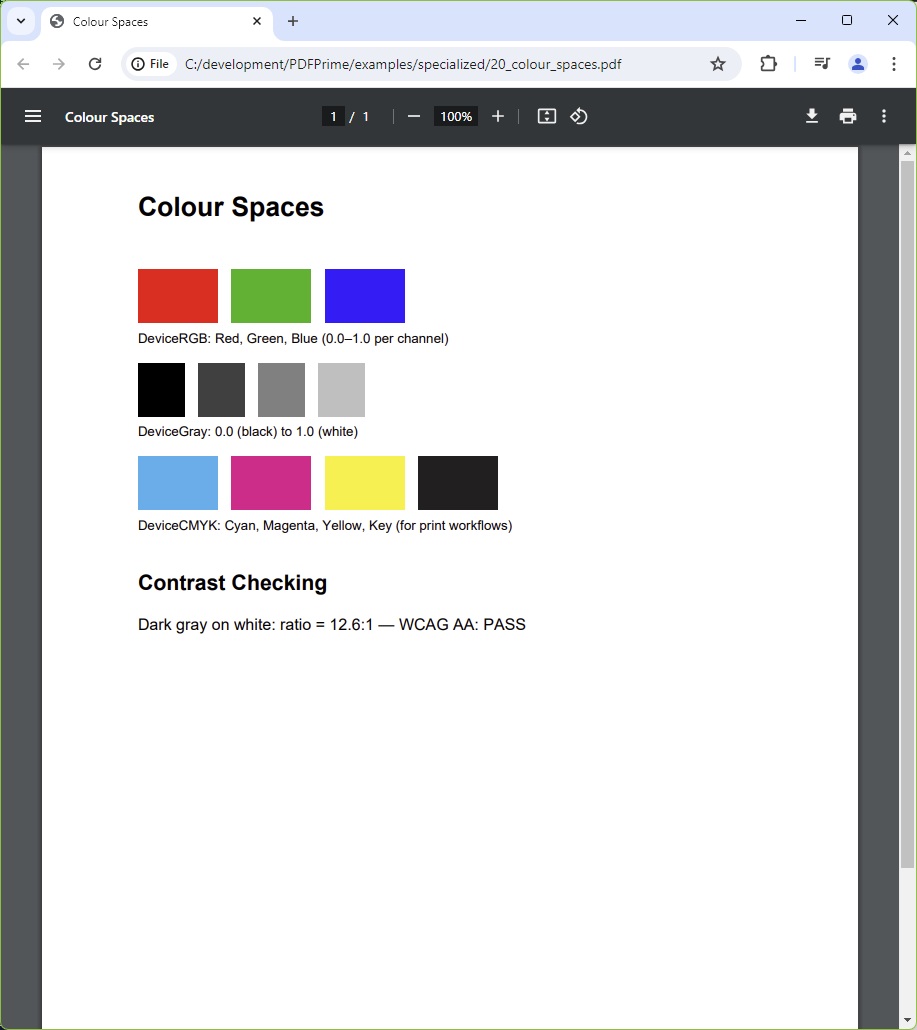
You should see a bold "Colour Spaces" heading and three labelled rows of swatches: an RGB row (red, green, blue squares), a CMYK row (process red, blue, and black squares), and a Grayscale row (dark grey, mid grey, light grey squares). Each row is labelled with its colour space name.
File: 20_colour_spaces.pdf
Colour Space Guide
| Space | Constructor | Best For |
|---|---|---|
| RGB | PdfColor.FromRgb(r, g, b) | Screen display, web PDFs |
| CMYK | PdfColor.FromCmyk(c, m, y, k) | Professional print production |
| Grayscale | PdfColor.FromGray(gray) | B&W documents, reducing file size |