♻️ Reusable Templates (Form XObjects)
Define headers, footers, and watermarks once — use them on every page without duplication.
Reusable Templates
using ObviousPDF;
using ObviousPDF.Accessibility;
using ObviousPDF.Fonts;

var doc = new PdfDocument();
doc.Info.Title = "Reusable Templates";
doc.Language = "en-US";
doc.DisplayDocTitle = true;
var root = doc.EnableTaggedPdf();

var header = doc.CreateFormXObject(612, 35);
header.FillRectangle(0, 0, 612, 35,
    new PdfDrawOptions { FillColor = PdfColor.FromRgb(0.12, 0.25, 0.55) });
header.AddText("COMPANY REPORT — CONFIDENTIAL", 72, 10,
    new PdfTextOptions { Font = StandardFont.HelveticaBold, FontSize = 10,
        Color = PdfColor.FromRgb(1, 1, 1) });

var footer = doc.CreateFormXObject(612, 30);
footer.DrawLine(72, 28, 540, 28,
    new PdfDrawOptions { StrokeColor = PdfColor.FromRgb(0.7, 0.7, 0.7) });
footer.AddText("Generated by ObviousPDF", 72, 8,
    new PdfTextOptions { Font = StandardFont.HelveticaOblique, FontSize = 8,
        Color = PdfColor.FromRgb(0.5, 0.5, 0.5) });

for (int i = 0; i < 3; i++)
{
    var page = doc.AddPage();
    page.BeginArtifact(PdfArtifactType.Pagination);
    page.AddFormXObject(header, 0, 757);
    page.EndArtifact();
    page.BeginArtifact(PdfArtifactType.Pagination);
    page.AddFormXObject(footer, 0, 0);
    page.EndArtifact();
    page.AddArtifactText($"Page {i + 1} of 3", 270, 10,
        PdfArtifactType.Pagination,
        new PdfTextOptions { FontSize = 8, Color = PdfColor.FromRgb(0.5, 0.5, 0.5) });

    var sect = root.AddChild(StructureType.Sect);
    var h = sect.AddChild(StructureType.H1);
    page.AddTaggedText(h, $"Section {i + 1}", 72, 720,
        new PdfTextOptions { Font = StandardFont.HelveticaBold, FontSize = 18 });
    var p = sect.AddChild(StructureType.P);
    page.AddTaggedText(p,
        "Header and footer are Form XObjects — defined once, reused everywhere.",
        72, 690, new PdfTextOptions { FontSize = 12 });
}
doc.Save("form_xobjects.pdf");
Imports ObviousPDF
Imports ObviousPDF.Accessibility
Imports ObviousPDF.Fonts
Dim doc As New PdfDocument()
doc.Info.Title = "Reusable Templates"
doc.Language = "en-US"
doc.DisplayDocTitle = True
Dim root = doc.EnableTaggedPdf()
Dim header = doc.CreateFormXObject(612, 35)
header.FillRectangle(0, 0, 612, 35,
New PdfDrawOptions With { .FillColor = PdfColor.FromRgb(0.12, 0.25, 0.55) })
header.AddText("COMPANY REPORT — CONFIDENTIAL", 72, 10,
New PdfTextOptions With { .Font = StandardFont.HelveticaBold, .FontSize = 10,
.Color = PdfColor.FromRgb(1, 1, 1) })
Dim footer = doc.CreateFormXObject(612, 30)
footer.DrawLine(72, 28, 540, 28,
New PdfDrawOptions With { .StrokeColor = PdfColor.FromRgb(0.7, 0.7, 0.7) })
footer.AddText("Generated by ObviousPDF", 72, 8,
New PdfTextOptions With { .Font = StandardFont.HelveticaOblique, .FontSize = 8,
.Color = PdfColor.FromRgb(0.5, 0.5, 0.5) })
For i As Integer = 0 To 2
Dim page = doc.AddPage()
page.BeginArtifact(PdfArtifactType.Pagination)
page.AddFormXObject(header, 0, 757)
page.EndArtifact()
page.BeginArtifact(PdfArtifactType.Pagination)
page.AddFormXObject(footer, 0, 0)
page.EndArtifact()
page.AddArtifactText($"Page {i + 1} of 3", 270, 10,
PdfArtifactType.Pagination,
New PdfTextOptions With { .FontSize = 8, .Color = PdfColor.FromRgb(0.5, 0.5, 0.5) })
Dim sect = root.AddChild(StructureType.Sect)
Dim h = sect.AddChild(StructureType.H1)
page.AddTaggedText(h, $"Section {i + 1}", 72, 720,
New PdfTextOptions With { .Font = StandardFont.HelveticaBold, .FontSize = 18 })
Dim p = sect.AddChild(StructureType.P)
page.AddTaggedText(p,
"Header and footer are Form XObjects — defined once, reused everywhere.",
72, 690, New PdfTextOptions With { .FontSize = 12 })
Next
doc.Save("form_xobjects.pdf")open ObviousPDF
open ObviousPDF.Accessibility
open ObviousPDF.Fonts
let doc = PdfDocument()
doc.Info.Title <- "Reusable Templates"
doc.Language <- "en-US"
doc.DisplayDocTitle <- true
let root = doc.EnableTaggedPdf()
let header = doc.CreateFormXObject(612.0, 35.0)
let hBg = PdfDrawOptions()
hBg.FillColor <- PdfColor.FromRgb(0.12, 0.25, 0.55)
header.FillRectangle(0.0, 0.0, 612.0, 35.0, hBg)
let hT = PdfTextOptions(Font = StandardFont.HelveticaBold, FontSize = 10.0)
hT.Color <- PdfColor.FromRgb(1.0, 1.0, 1.0)
header.AddText("COMPANY REPORT — CONFIDENTIAL", 72.0, 10.0, hT)
let footer = doc.CreateFormXObject(612.0, 30.0)
let fL = PdfDrawOptions()
fL.StrokeColor <- PdfColor.FromRgb(0.7, 0.7, 0.7)
footer.DrawLine(72.0, 28.0, 540.0, 28.0, fL)
let fT = PdfTextOptions(Font = StandardFont.HelveticaOblique, FontSize = 8.0)
fT.Color <- PdfColor.FromRgb(0.5, 0.5, 0.5)
footer.AddText("Generated by ObviousPDF", 72.0, 8.0, fT)
for i in 0 .. 2 do
let page = doc.AddPage()
page.BeginArtifact(PdfArtifactType.Pagination)
page.AddFormXObject(header, 0.0, 757.0)
page.EndArtifact()
page.BeginArtifact(PdfArtifactType.Pagination)
page.AddFormXObject(footer, 0.0, 0.0)
page.EndArtifact()
let pgO = PdfTextOptions(FontSize = 8.0)
pgO.Color <- PdfColor.FromRgb(0.5, 0.5, 0.5)
page.AddArtifactText(sprintf "Page %d of 3" (i+1), 270.0, 10.0,
PdfArtifactType.Pagination, pgO)
let sect = root.AddChild(StructureType.Sect)
let h = sect.AddChild(StructureType.H1)
page.AddTaggedText(h, sprintf "Section %d" (i+1), 72.0, 720.0,
PdfTextOptions(Font = StandardFont.HelveticaBold, FontSize = 18.0))
let p = sect.AddChild(StructureType.P)
page.AddTaggedText(p,
"Header and footer are Form XObjects — defined once, reused everywhere.",
72.0, 690.0, PdfTextOptions(FontSize = 12.0))
doc.Save("form_xobjects.pdf")Add-Type -Path "ObviousPDF.dll"
$doc = [ObviousPDF.PdfDocument]::new()
$doc.Info.Title = "Form XObjects"
$doc.Language = "en-US"
$doc.DisplayDocTitle = $true
# Define header once
$header = $doc.CreateFormXObject(612, 35)
$header.FillRectangle(0, 0, 612, 35,
[ObviousPDF.PdfDrawOptions]@{
FillColor = [ObviousPDF.PdfColor]::FromRgb(0.12, 0.25, 0.55)
})
$header.AddText("COMPANY REPORT", 72, 10,
[ObviousPDF.PdfTextOptions]@{
Font = [ObviousPDF.Fonts.StandardFont]::HelveticaBold
FontSize = 10
Color = [ObviousPDF.PdfColor]::FromRgb(1, 1, 1)
})
# Use on every page (artifact)
for ($i = 0; $i -lt 3; $i++) {
$page = $doc.AddPage()
$page.BeginArtifact([ObviousPDF.Accessibility.PdfArtifactType]::Pagination)
$page.AddFormXObject($header, 0, 757)
$page.EndArtifact()
}
$doc.Save("c:\temp\form_xobjects.pdf")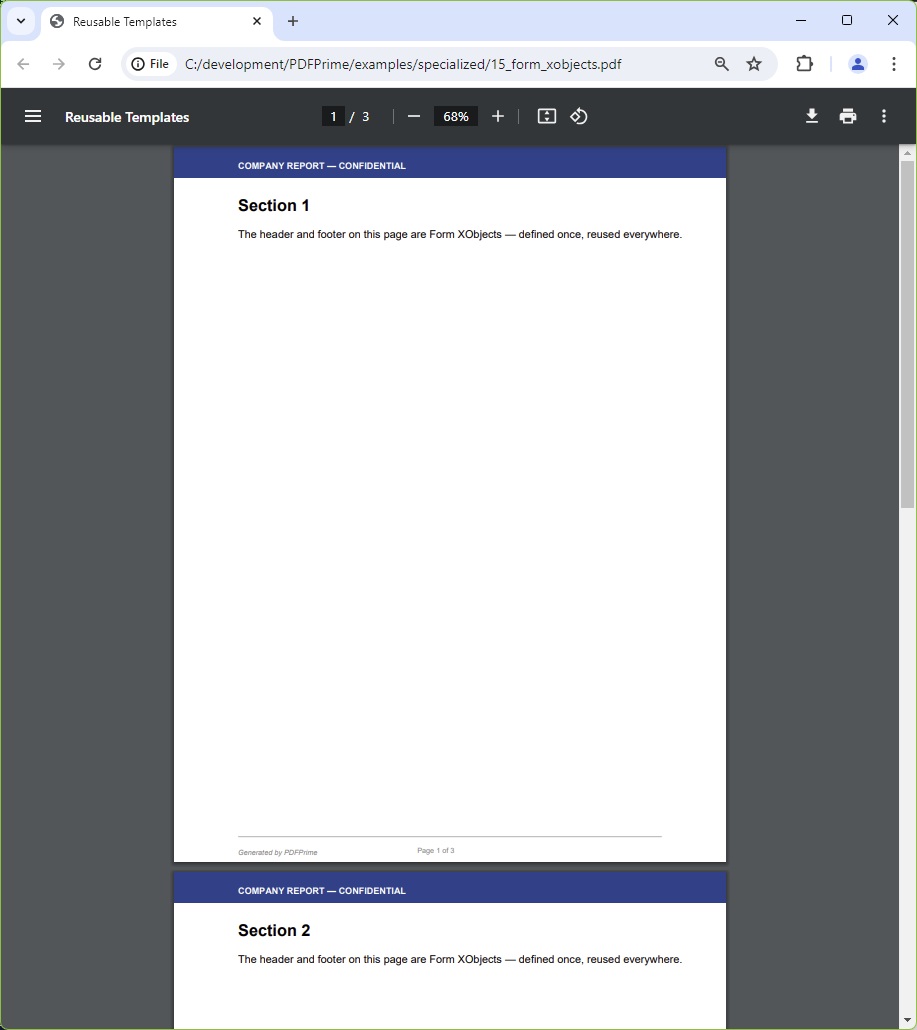
You should see three pages each sharing an identical dark-blue header bar reading "COMPANY REPORT — CONFIDENTIAL" in white bold text, and an identical grey footer line with "Generated by ObviousPDF" in italic grey and a centred page number. Only the section headings (Section 1, Section 2, Section 3) and body paragraphs differ per page.
File: 15_form_xobjects.pdf