📊 Accessible Tables
Full table structure with THead/TBody, header scope, ID/Headers associations, and captions.
Accessible Table
using ObviousPDF;
using ObviousPDF.Accessibility;
using ObviousPDF.Fonts;

var doc = new PdfDocument();
doc.Info.Title = "Accessible Table";
doc.Language = "en-US";
doc.DisplayDocTitle = true;
doc.PdfUaConformance = PdfUaConformanceLevel.PdfUA1;
var root = doc.EnableTaggedPdf();
var page = doc.AddPage();

var h1 = root.AddChild(StructureType.H1);
page.AddTaggedText(h1, "Accessible Table", 72, 740,
    new PdfTextOptions { Font = StandardFont.HelveticaBold, FontSize = 20 });

var table = root.AddChild(StructureType.Table);

var caption = table.AddCaption();
page.AddTaggedText(caption, "Table 1: Employees", 72, 710);

// Header row
var thead = table.AddTableHead();
var hrow = thead.AddTableRow();
var thName = hrow.AddHeaderCell(PdfTableScope.Column, id: "name", shortText: "Name");
var thDept = hrow.AddHeaderCell(PdfTableScope.Column, id: "dept", shortText: "Dept");
var thEmail = hrow.AddHeaderCell(PdfTableScope.Column, id: "email", shortText: "Email");

// Data row
var tbody = table.AddTableBody();
var row1 = tbody.AddTableRow();
var td1Name = row1.AddDataCell("name");
var td1Dept = row1.AddDataCell("dept");
var td1Email = row1.AddDataCell("email");

// Render header cells
page.AddTaggedText(thName, "Name", 72, 680);
page.AddTaggedText(thDept, "Dept", 220, 680);
page.AddTaggedText(thEmail, "Email", 360, 680);

// Render data cells
page.AddTaggedText(td1Name, "Alice", 72, 655);
page.AddTaggedText(td1Dept, "Eng", 220, 655);
page.AddTaggedText(td1Email, "alice@example.com", 360, 655);

doc.Save("accessible_table.pdf");
Imports ObviousPDF
Imports ObviousPDF.Accessibility
Imports ObviousPDF.Fonts
Dim doc As New PdfDocument()
doc.Info.Title = "Accessible Table"
doc.Language = "en-US"
doc.DisplayDocTitle = True
doc.PdfUaConformance = PdfUaConformanceLevel.PdfUA1
Dim root = doc.EnableTaggedPdf()
Dim page = doc.AddPage()
Dim h1 = root.AddChild(StructureType.H1)
page.AddTaggedText(h1, "Accessible Table", 72, 740,
New PdfTextOptions With { .Font = StandardFont.HelveticaBold, .FontSize = 20 })
Dim table = root.AddChild(StructureType.Table)
Dim caption = table.AddCaption()
page.AddTaggedText(caption, "Table 1: Employees", 72, 710)
' Header row
Dim thead = table.AddTableHead()
Dim hrow = thead.AddTableRow()
Dim thName = hrow.AddHeaderCell(PdfTableScope.Column, id:="name", shortText:="Name")
Dim thDept = hrow.AddHeaderCell(PdfTableScope.Column, id:="dept", shortText:="Dept")
Dim thEmail = hrow.AddHeaderCell(PdfTableScope.Column, id:="email", shortText:="Email")
' Data row
Dim tbody = table.AddTableBody()
Dim row1 = tbody.AddTableRow()
Dim td1Name = row1.AddDataCell("name")
Dim td1Dept = row1.AddDataCell("dept")
Dim td1Email = row1.AddDataCell("email")
' Render header cells
page.AddTaggedText(thName, "Name", 72, 680)
page.AddTaggedText(thDept, "Dept", 220, 680)
page.AddTaggedText(thEmail, "Email", 360, 680)
' Render data cells
page.AddTaggedText(td1Name, "Alice", 72, 655)
page.AddTaggedText(td1Dept, "Eng", 220, 655)
page.AddTaggedText(td1Email, "alice@example.com", 360, 655)
doc.Save("accessible_table.pdf")open ObviousPDF
open ObviousPDF.Accessibility
open ObviousPDF.Fonts
let doc = PdfDocument()
doc.Info.Title <- "Accessible Table"
doc.Language <- "en-US"
doc.DisplayDocTitle <- true
doc.PdfUaConformance <- PdfUaConformanceLevel.PdfUA1
let root = doc.EnableTaggedPdf()
let page = doc.AddPage()
let h1 = root.AddChild(StructureType.H1)
page.AddTaggedText(h1, "Accessible Table", 72.0, 740.0,
PdfTextOptions(Font = StandardFont.HelveticaBold, FontSize = 20.0))
let table = root.AddChild(StructureType.Table)
let caption = table.AddCaption()
page.AddTaggedText(caption, "Table 1: Employees", 72.0, 710.0)
// Header row
let thead = table.AddTableHead()
let hrow = thead.AddTableRow()
let thName = hrow.AddHeaderCell(PdfTableScope.Column, id = "name", shortText = "Name")
let thDept = hrow.AddHeaderCell(PdfTableScope.Column, id = "dept", shortText = "Dept")
let thEmail = hrow.AddHeaderCell(PdfTableScope.Column, id = "email", shortText = "Email")
// Data row
let tbody = table.AddTableBody()
let row1 = tbody.AddTableRow()
let td1Name = row1.AddDataCell("name")
let td1Dept = row1.AddDataCell("dept")
let td1Email = row1.AddDataCell("email")
// Render header cells
page.AddTaggedText(thName, "Name", 72.0, 680.0)
page.AddTaggedText(thDept, "Dept", 220.0, 680.0)
page.AddTaggedText(thEmail, "Email", 360.0, 680.0)
// Render data cells
page.AddTaggedText(td1Name, "Alice", 72.0, 655.0)
page.AddTaggedText(td1Dept, "Eng", 220.0, 655.0)
page.AddTaggedText(td1Email, "alice@example.com", 360.0, 655.0)
doc.Save("accessible_table.pdf")Add-Type -Path "ObviousPDF.dll"
$doc = [ObviousPDF.PdfDocument]::new()
$doc.Info.Title = "Accessible Table"
$doc.Language = "en-US"
$doc.DisplayDocTitle = $true
$root = $doc.EnableTaggedPdf()
$page = $doc.AddPage()
$table = $root.AddChild([ObviousPDF.Accessibility.StructureType]::Table)
# Caption linked to the table
$caption = $table.AddCaption()
$page.AddTaggedText($caption,
"Table 1: Employees", 72, 710)
# Header row group
$thead = $table.AddTableHead()
$hrow = $thead.AddTableRow()
# Header cells with scope and ID
$thName = $hrow.AddHeaderCell(
[ObviousPDF.Accessibility.PdfTableScope]::Column, "name", "Name")
$thDept = $hrow.AddHeaderCell(
[ObviousPDF.Accessibility.PdfTableScope]::Column, "dept", "Dept")
$thEmail = $hrow.AddHeaderCell(
[ObviousPDF.Accessibility.PdfTableScope]::Column, "email", "Email")
# Body row group
$tbody = $table.AddTableBody()
$row1 = $tbody.AddTableRow()
# Data cells reference header IDs
$td1Name = $row1.AddDataCell("name")
$td1Dept = $row1.AddDataCell("dept")
$td1Email = $row1.AddDataCell("email")
# Render header cells
$page.AddTaggedText($thName, "Name", 72, 680)
$page.AddTaggedText($thDept, "Dept", 220, 680)
$page.AddTaggedText($thEmail, "Email", 360, 680)
# Render data cells
$page.AddTaggedText($td1Name, "Alice", 72, 655)
$page.AddTaggedText($td1Dept, "Eng", 220, 655)
$page.AddTaggedText($td1Email,
"alice@example.com", 360, 655)
$doc.Save("c:\temp\accessible_table.pdf")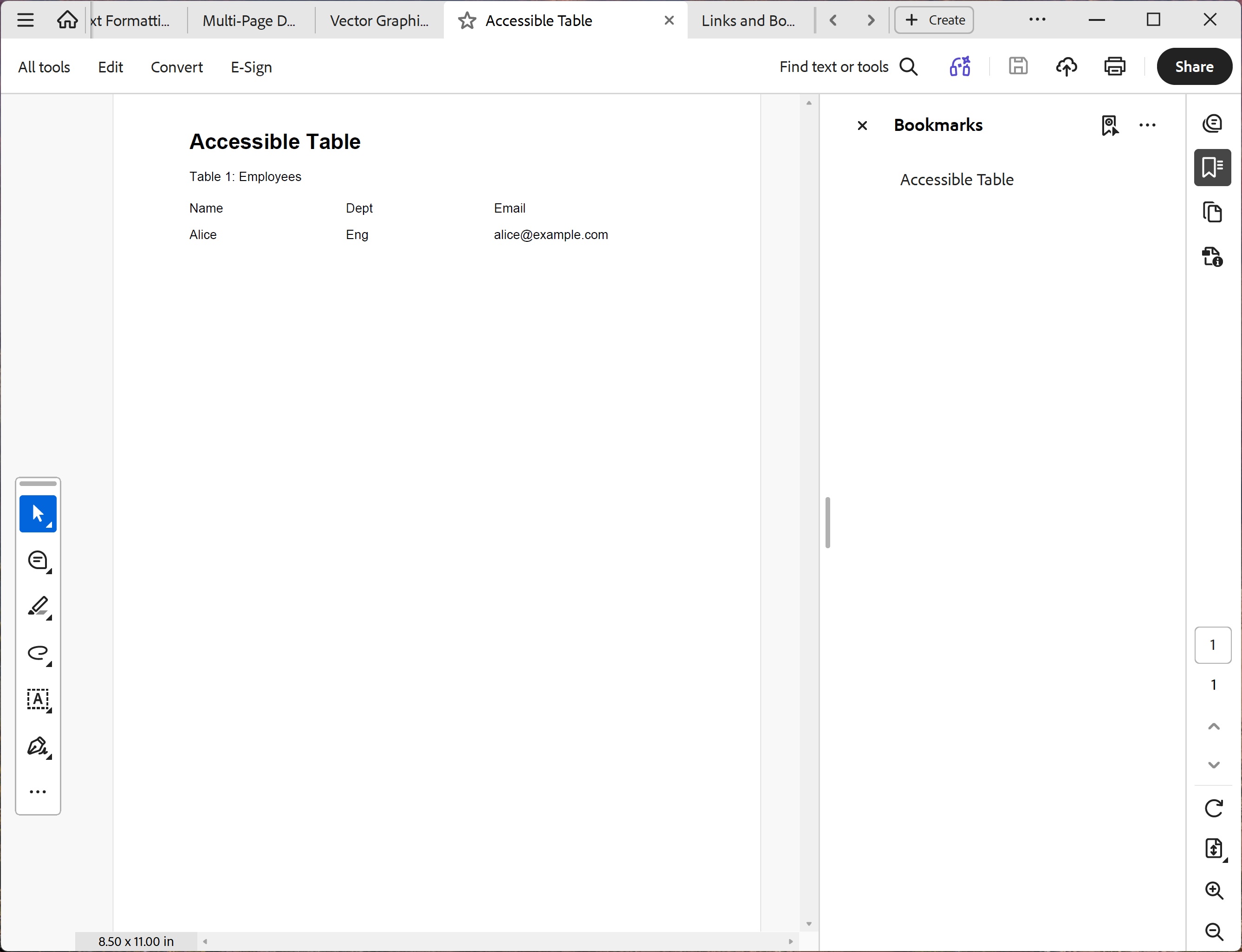
You should see a bold "Accessible Table" heading, a "Table 1: Employees" caption, a header row with columns Name / Dept / Email, and one data row containing Alice / Eng / alice@example.com. In a PDF viewer's Tags panel the structure should show Table › Caption, THead › TR › TH (×3), TBody › TR › TD (×3).
File: 06_accessible_table.pdf
Table Structure Elements
| Method | Creates | Purpose |
|---|---|---|
AddTableHead() | THead | Header row group |
AddTableBody() | TBody | Body row group |
AddTableFoot() | TFoot | Footer row group |
AddTableRow() | TR | Table row |
AddHeaderCell(scope, id) | TH | Header cell with scope |
AddDataCell(headerIds) | TD | Data cell linked to headers |
AddCaption() | Caption | Table caption/title |