🌏 CJK & Pronunciation
International text, pronunciation hints for screen readers, Ruby annotations, and language-of-parts.
International Accessibility
using ObviousPDF;
using ObviousPDF.Accessibility;
using ObviousPDF.Fonts;

var doc = new PdfDocument();
doc.Info.Title = "CJK and Pronunciation";
doc.Language = "en-US";
doc.DisplayDocTitle = true;
doc.PdfVersion = "2.0";
var root = doc.EnableTaggedPdf();
var page = doc.AddPage();

var h1 = root.AddChild(StructureType.H1);
page.AddTaggedText(h1, "International Text and Pronunciation", 72, 740,
    new PdfTextOptions { Font = StandardFont.HelveticaBold, FontSize = 20 });

var sect = root.AddChild(StructureType.Sect);
var h2 = sect.AddChild(StructureType.H2);
page.AddTaggedText(h2, "Pronunciation Hints (PDF 2.0)", 72, 700,
    new PdfTextOptions { Font = StandardFont.HelveticaBold, FontSize = 16 });
var p1 = sect.AddChild(StructureType.P);
page.AddTaggedText(p1, "The philosopher ", 72, 670,
    new PdfTextOptions { FontSize = 12 });

var nameSpan = sect.AddChild(StructureType.Span);
nameSpan.Phoneme = "\u02C8ni\u02D0t\u0283\u0259";
nameSpan.PhoneticAlphabet = PdfPhoneticAlphabet.Ipa;
page.AddTaggedText(nameSpan, "Nietzsche", 170, 670,
    new PdfTextOptions { Font = StandardFont.HelveticaBold, FontSize = 12 });

var sect2 = root.AddChild(StructureType.Sect);
var h2b = sect2.AddChild(StructureType.H2);
page.AddTaggedText(h2b, "Language of Parts", 72, 620,
    new PdfTextOptions { Font = StandardFont.HelveticaBold, FontSize = 16 });
var pLang = sect2.AddChild(StructureType.P);
page.AddTaggedText(pLang, "English text with ", 72, 590,
    new PdfTextOptions { FontSize = 12 });

var frSpan = sect2.AddChild(StructureType.Span);
frSpan.Language = "fr";
page.AddTaggedText(frSpan, "bon app\u00E9tit", 190, 590,
    new PdfTextOptions { Font = StandardFont.HelveticaOblique, FontSize = 12 });

var sect3 = root.AddChild(StructureType.Sect);
var h2c = sect3.AddChild(StructureType.H2);
page.AddTaggedText(h2c, "Ruby Annotations (CJK)", 72, 540,
    new PdfTextOptions { Font = StandardFont.HelveticaBold, FontSize = 16 });
var pRuby = sect3.AddChild(StructureType.P);
page.AddTaggedText(pRuby,
    "Ruby annotations provide reading aids for CJK characters.",
    72, 510, new PdfTextOptions { FontSize = 12 });

var (_, rb, rt) = sect3.AddRuby(includeParentheses: false);
page.AddTaggedText(rb, "Kanji", 72, 480,
    new PdfTextOptions { FontSize = 14 });
page.AddTaggedText(rt, "(reading)", 72, 498,
    new PdfTextOptions { FontSize = 8, Color = PdfColor.FromRgb(0.5, 0, 0) });

doc.Save("cjk_pronunciation.pdf");
Imports ObviousPDF
Imports ObviousPDF.Accessibility
Imports ObviousPDF.Fonts
Dim doc As New PdfDocument()
doc.Info.Title = "CJK and Pronunciation"
doc.Language = "en-US"
doc.DisplayDocTitle = True
doc.PdfVersion = "2.0"
Dim root = doc.EnableTaggedPdf()
Dim page = doc.AddPage()
Dim h1 = root.AddChild(StructureType.H1)
page.AddTaggedText(h1, "International Text and Pronunciation", 72, 740,
New PdfTextOptions With { .Font = StandardFont.HelveticaBold, .FontSize = 20 })
Dim sect = root.AddChild(StructureType.Sect)
Dim h2 = sect.AddChild(StructureType.H2)
page.AddTaggedText(h2, "Pronunciation Hints (PDF 2.0)", 72, 700,
New PdfTextOptions With { .Font = StandardFont.HelveticaBold, .FontSize = 16 })
Dim p1 = sect.AddChild(StructureType.P)
page.AddTaggedText(p1, "The philosopher ", 72, 670,
New PdfTextOptions With { .FontSize = 12 })
Dim nameSpan = sect.AddChild(StructureType.Span)
nameSpan.Phoneme = ChrW(&H2C8) & "ni" & ChrW(&H2D0) & "t" & ChrW(&H283) & ChrW(&H259)
nameSpan.PhoneticAlphabet = PdfPhoneticAlphabet.Ipa
page.AddTaggedText(nameSpan, "Nietzsche", 170, 670,
New PdfTextOptions With { .Font = StandardFont.HelveticaBold, .FontSize = 12 })
Dim sect2 = root.AddChild(StructureType.Sect)
Dim h2b = sect2.AddChild(StructureType.H2)
page.AddTaggedText(h2b, "Language of Parts", 72, 620,
New PdfTextOptions With { .Font = StandardFont.HelveticaBold, .FontSize = 16 })
Dim pLang = sect2.AddChild(StructureType.P)
page.AddTaggedText(pLang, "English text with ", 72, 590,
New PdfTextOptions With { .FontSize = 12 })
Dim frSpan = sect2.AddChild(StructureType.Span)
frSpan.Language = "fr"
page.AddTaggedText(frSpan, "bon app" & ChrW(&HE9) & "tit", 190, 590,
New PdfTextOptions With { .Font = StandardFont.HelveticaOblique, .FontSize = 12 })
Dim sect3 = root.AddChild(StructureType.Sect)
Dim h2c = sect3.AddChild(StructureType.H2)
page.AddTaggedText(h2c, "Ruby Annotations (CJK)", 72, 540,
New PdfTextOptions With { .Font = StandardFont.HelveticaBold, .FontSize = 16 })
Dim pRuby = sect3.AddChild(StructureType.P)
page.AddTaggedText(pRuby,
"Ruby annotations provide reading aids for CJK characters.",
72, 510, New PdfTextOptions With { .FontSize = 12 })
Dim rubyResult = sect3.AddRuby(includeParentheses:=False)
Dim rb = rubyResult.Item2
Dim rt = rubyResult.Item3
page.AddTaggedText(rb, "Kanji", 72, 480,
New PdfTextOptions With { .FontSize = 14 })
page.AddTaggedText(rt, "(reading)", 72, 498,
New PdfTextOptions With { .FontSize = 8, .Color = PdfColor.FromRgb(0.5, 0, 0) })
doc.Save("cjk_pronunciation.pdf")open ObviousPDF
open ObviousPDF.Accessibility
open ObviousPDF.Fonts
let doc = PdfDocument()
doc.Info.Title <- "CJK and Pronunciation"
doc.Language <- "en-US"
doc.DisplayDocTitle <- true
doc.PdfVersion <- "2.0"
let root = doc.EnableTaggedPdf()
let page = doc.AddPage()
let h1 = root.AddChild(StructureType.H1)
page.AddTaggedText(h1, "International Text and Pronunciation", 72.0, 740.0,
PdfTextOptions(Font = StandardFont.HelveticaBold, FontSize = 20.0))
let sect = root.AddChild(StructureType.Sect)
let h2O = PdfTextOptions(Font = StandardFont.HelveticaBold, FontSize = 16.0)
let h2 = sect.AddChild(StructureType.H2)
page.AddTaggedText(h2, "Pronunciation Hints (PDF 2.0)", 72.0, 700.0, h2O)
let p1 = sect.AddChild(StructureType.P)
page.AddTaggedText(p1, "The philosopher ", 72.0, 670.0, PdfTextOptions(FontSize = 12.0))
let nameSpan = sect.AddChild(StructureType.Span)
nameSpan.Phoneme <- "\u02C8ni\u02D0t\u0283\u0259"
nameSpan.PhoneticAlphabet <- PdfPhoneticAlphabet.Ipa
page.AddTaggedText(nameSpan, "Nietzsche", 170.0, 670.0,
PdfTextOptions(Font = StandardFont.HelveticaBold, FontSize = 12.0))
let sect2 = root.AddChild(StructureType.Sect)
let h2b = sect2.AddChild(StructureType.H2)
page.AddTaggedText(h2b, "Language of Parts", 72.0, 620.0, h2O)
let pLang = sect2.AddChild(StructureType.P)
page.AddTaggedText(pLang, "English text with ", 72.0, 590.0,
PdfTextOptions(FontSize = 12.0))
let frSpan = sect2.AddChild(StructureType.Span)
frSpan.Language <- "fr"
page.AddTaggedText(frSpan, "bon app\u00E9tit", 190.0, 590.0,
PdfTextOptions(Font = StandardFont.HelveticaOblique, FontSize = 12.0))
let sect3 = root.AddChild(StructureType.Sect)
let h2c = sect3.AddChild(StructureType.H2)
page.AddTaggedText(h2c, "Ruby Annotations (CJK)", 72.0, 540.0, h2O)
let pRuby = sect3.AddChild(StructureType.P)
page.AddTaggedText(pRuby,
"Ruby annotations provide reading aids for CJK characters.",
72.0, 510.0, PdfTextOptions(FontSize = 12.0))
let rubyResult = sect3.AddRuby(includeParentheses = false)
let rb = rubyResult.Item2
let rt = rubyResult.Item3
page.AddTaggedText(rb, "Kanji", 72.0, 480.0, PdfTextOptions(FontSize = 14.0))
let rtO = PdfTextOptions(FontSize = 8.0)
rtO.Color <- PdfColor.FromRgb(0.5, 0.0, 0.0)
page.AddTaggedText(rt, "(reading)", 72.0, 498.0, rtO)
doc.Save("cjk_pronunciation.pdf")Add-Type -Path "ObviousPDF.dll"
$doc = [ObviousPDF.PdfDocument]::new()
$doc.Info.Title = "CJK Pronunciation"
$doc.Language = "en-US"
$doc.DisplayDocTitle = $true
$root = $doc.EnableTaggedPdf()
$page = $doc.AddPage()
$sect = $root.AddChild([ObviousPDF.Accessibility.StructureType]::Sect)
# Pronunciation hint (PDF 2.0)
$nameElem = $sect.AddChild(
[ObviousPDF.Accessibility.StructureType]::Span)
$nameElem.Phoneme = "niitSe"
$nameElem.PhoneticAlphabet =
[ObviousPDF.Accessibility.PdfPhoneticAlphabet]::Ipa
$page.AddTaggedText($nameElem, "Nietzsche", 170, 670)
# Language of parts
$frSpan = $sect.AddChild(
[ObviousPDF.Accessibility.StructureType]::Span)
$frSpan.Language = "fr" # Override to French
$page.AddTaggedText($frSpan,
"bon appetit", 190, 590)
# Ruby annotations (CJK reading aids)
$rubyResult = $sect.AddRuby($false)
$ruby = $rubyResult.Item1
$rb = $rubyResult.Item2
$rt = $rubyResult.Item3
$page.AddTaggedText($rb, "Kanji", 72, 480,
[ObviousPDF.PdfTextOptions]@{ FontSize = 14 })
$page.AddTaggedText($rt, "(reading)", 72, 498,
[ObviousPDF.PdfTextOptions]@{
FontSize = 8
Color = [ObviousPDF.PdfColor]::FromRgb(0.5, 0, 0)
})
$doc.Save("c:\temp\cjk_pronunciation.pdf")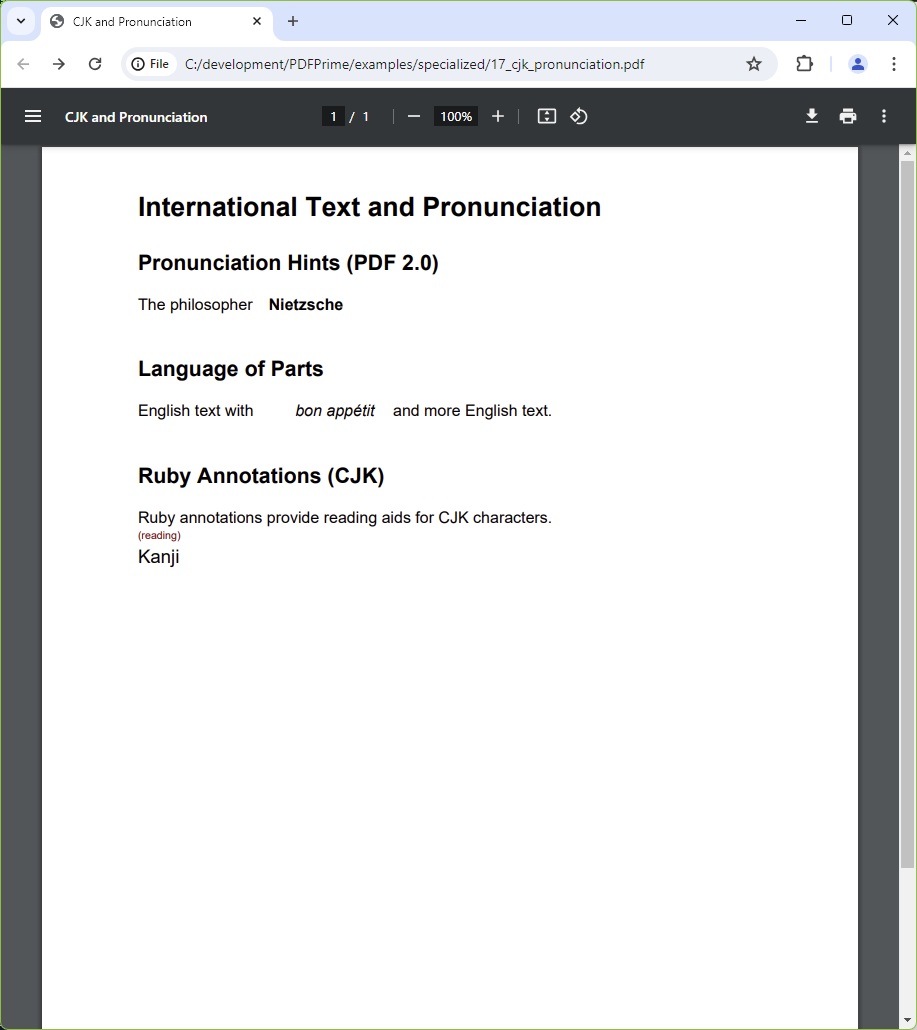
You should see three sections: "Pronunciation Hints" — a sentence containing "Nietzsche" in bold (IPA phoneme ˈniːtʃə attached in the tag tree); "Language of Parts" — a line mixing English and italic "bon appétit" (tagged with lang="fr"); "Ruby Annotations (CJK)" — the word "Kanji" with "(reading)" in small red text appearing above it as a ruby annotation.
File: 17_cjk_pronunciation.pdf