🔗 Links & Bookmarks
Accessible tagged hyperlinks and document outline for sidebar navigation.
Links & Bookmarks
using ObviousPDF;
using ObviousPDF.Accessibility;
using ObviousPDF.Fonts;

var doc = new PdfDocument();
doc.Info.Title = "Links and Bookmarks";
doc.Language = "en-US";
doc.DisplayDocTitle = true;
var root = doc.EnableTaggedPdf();

var page1 = doc.AddPage();
var h1 = root.AddChild(StructureType.H1);
page1.AddTaggedText(h1, "Navigation Examples", 72, 740,
    new PdfTextOptions { Font = StandardFont.HelveticaBold, FontSize = 20 });

var p1 = root.AddChild(StructureType.P);
var linkSE = p1.AddChild(StructureType.Link);
page1.AddTaggedLink(linkSE, "https://github.com/alanfrans/ObviousPDF",
    "Visit ObviousPDF on GitHub", 72, 700, 160, 14,
    new PdfTextOptions { Color = PdfColor.FromRgb(0, 0.2, 0.8), FontSize = 12 });

var page2 = doc.AddPage();
var sect2 = root.AddChild(StructureType.Sect);
var h2 = sect2.AddChild(StructureType.H2);
page2.AddTaggedText(h2, "Chapter 2: Details", 72, 740,
    new PdfTextOptions { Font = StandardFont.HelveticaBold, FontSize = 18 });
var pDetail = sect2.AddChild(StructureType.P);
page2.AddTaggedText(pDetail,
    "This page is reachable via the bookmark panel.", 72, 710,
    new PdfTextOptions { FontSize = 12 });

var ch1 = doc.AddOutline("Chapter 1: Links", 0);
ch1.AddChild("Hyperlinks", 0);
ch1.AddChild("Tagged Links", 0);
doc.AddOutline("Chapter 2: Details", 1);

doc.Save("links_bookmarks.pdf");
Imports ObviousPDF
Imports ObviousPDF.Accessibility
Imports ObviousPDF.Fonts
Dim doc As New PdfDocument()
doc.Info.Title = "Links and Bookmarks"
doc.Language = "en-US"
doc.DisplayDocTitle = True
Dim root = doc.EnableTaggedPdf()
Dim page1 = doc.AddPage()
Dim h1 = root.AddChild(StructureType.H1)
page1.AddTaggedText(h1, "Navigation Examples", 72, 740,
New PdfTextOptions With { .Font = StandardFont.HelveticaBold, .FontSize = 20 })
Dim p1 = root.AddChild(StructureType.P)
Dim linkSE = p1.AddChild(StructureType.Link)
page1.AddTaggedLink(linkSE, "https://github.com/alanfrans/ObviousPDF",
"Visit ObviousPDF on GitHub", 72, 700, 160, 14,
New PdfTextOptions With { .Color = PdfColor.FromRgb(0, 0.2, 0.8), .FontSize = 12 })
Dim page2 = doc.AddPage()
Dim sect2 = root.AddChild(StructureType.Sect)
Dim h2 = sect2.AddChild(StructureType.H2)
page2.AddTaggedText(h2, "Chapter 2: Details", 72, 740,
New PdfTextOptions With { .Font = StandardFont.HelveticaBold, .FontSize = 18 })
Dim pDetail = sect2.AddChild(StructureType.P)
page2.AddTaggedText(pDetail,
"This page is reachable via the bookmark panel.", 72, 710,
New PdfTextOptions With { .FontSize = 12 })
Dim ch1 = doc.AddOutline("Chapter 1: Links", 0)
ch1.AddChild("Hyperlinks", 0)
ch1.AddChild("Tagged Links", 0)
doc.AddOutline("Chapter 2: Details", 1)
doc.Save("links_bookmarks.pdf")open ObviousPDF
open ObviousPDF.Accessibility
open ObviousPDF.Fonts
let doc = PdfDocument()
doc.Info.Title <- "Links and Bookmarks"
doc.Language <- "en-US"
doc.DisplayDocTitle <- true
let root = doc.EnableTaggedPdf()
let page1 = doc.AddPage()
let h1 = root.AddChild(StructureType.H1)
page1.AddTaggedText(h1, "Navigation Examples", 72.0, 740.0,
PdfTextOptions(Font = StandardFont.HelveticaBold, FontSize = 20.0))
let p1 = root.AddChild(StructureType.P)
let linkSE = p1.AddChild(StructureType.Link)
let lkO = PdfTextOptions(FontSize = 12.0)
lkO.Color <- PdfColor.FromRgb(0.0, 0.2, 0.8)
page1.AddTaggedLink(linkSE, "https://github.com/alanfrans/ObviousPDF",
"Visit ObviousPDF on GitHub", 72.0, 700.0, 160.0, 14.0, lkO)
let page2 = doc.AddPage()
let sect2 = root.AddChild(StructureType.Sect)
let h2 = sect2.AddChild(StructureType.H2)
page2.AddTaggedText(h2, "Chapter 2: Details", 72.0, 740.0,
PdfTextOptions(Font = StandardFont.HelveticaBold, FontSize = 18.0))
let pDetail = sect2.AddChild(StructureType.P)
page2.AddTaggedText(pDetail,
"This page is reachable via the bookmark panel.",
72.0, 710.0, PdfTextOptions(FontSize = 12.0))
let ch1 = doc.AddOutline("Chapter 1: Links", 0)
ch1.AddChild("Hyperlinks", 0) |> ignore
ch1.AddChild("Tagged Links", 0) |> ignore
doc.AddOutline("Chapter 2: Details", 1) |> ignore
doc.Save("links_bookmarks.pdf")Add-Type -Path "ObviousPDF.dll"
$doc = [ObviousPDF.PdfDocument]::new()
$doc.Info.Title = "Links and Bookmarks"
$doc.Language = "en-US"
$doc.DisplayDocTitle = $true
$root = $doc.EnableTaggedPdf()
$page = $doc.AddPage()
# Accessible tagged link (recommended)
$p1 = $root.AddChild([ObviousPDF.Accessibility.StructureType]::P)
$linkSE = $p1.AddChild([ObviousPDF.Accessibility.StructureType]::Link)
$opts = [ObviousPDF.PdfTextOptions]::new()
$opts.Color = [ObviousPDF.PdfColor]::FromRgb(0, 0.2, 0.8)
$opts.FontSize = 12
$page.AddTaggedLink($linkSE,
"https://github.com/alanfrans/ObviousPDF",
"Visit ObviousPDF on GitHub",
72, 700, 160, 14, $opts)
# Document bookmarks (outline panel)
$ch1 = $doc.AddOutline("Chapter 1: Links", 0)
$ch1.AddChild("Hyperlinks", 0)
$ch1.AddChild("Tagged Links", 0)
$doc.AddOutline("Chapter 2: Details", 1)
$doc.Save("c:\temp\links_bookmarks.pdf")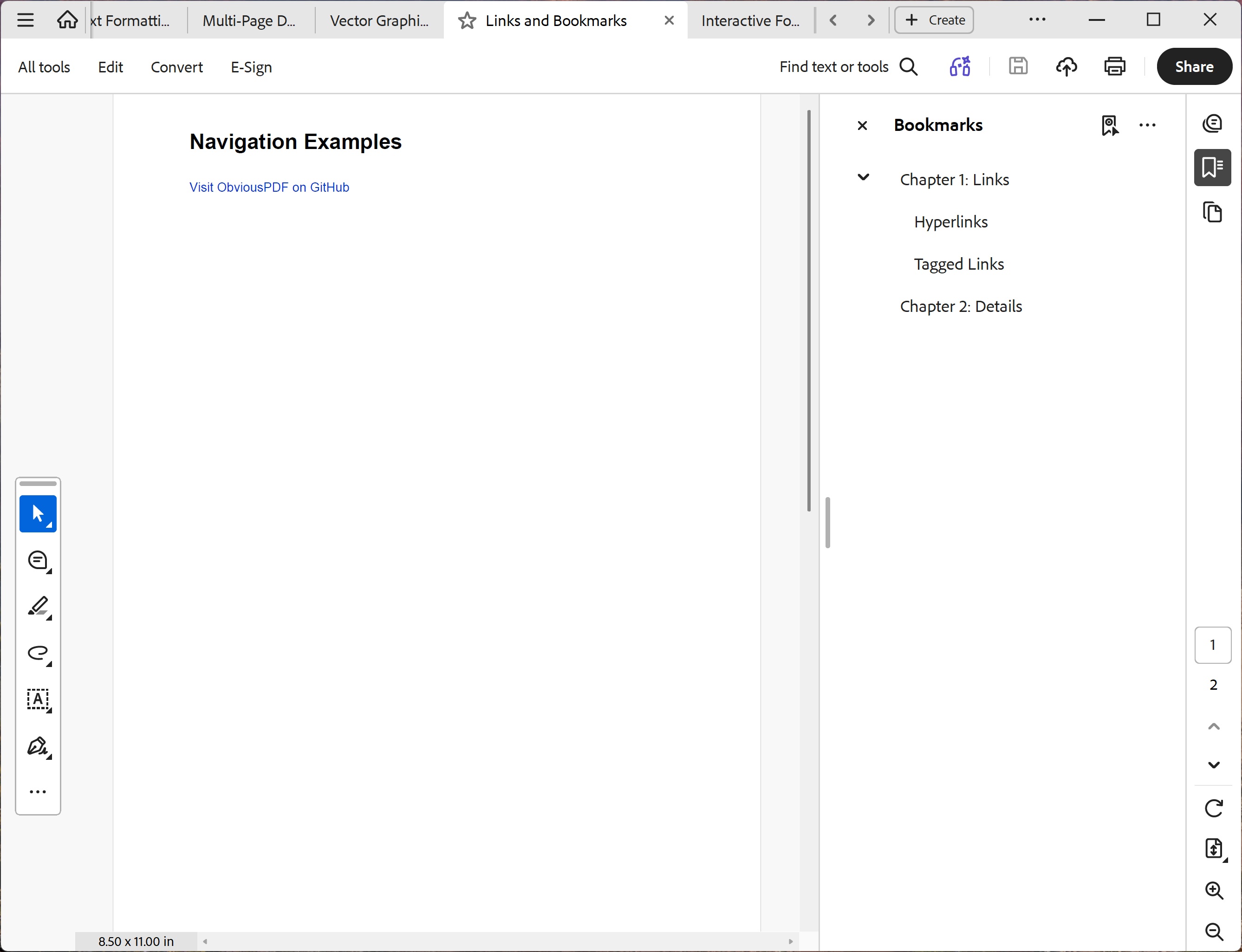
You should see two pages. Page 1 has a bold "Navigation Examples" heading and a blue underlined link reading "Visit ObviousPDF on GitHub". Page 2 has a bold "Chapter 2: Details" heading and body text. Open the Bookmarks panel to see "Chapter 1: Links" (with children Hyperlinks and Tagged Links) and "Chapter 2: Details".
File: 07_links_bookmarks.pdf