🌈 Gradients & Patterns
Axial and radial gradients, tiling patterns for backgrounds and decorative fills.
Gradients & Patterns
using ObviousPDF;
using ObviousPDF.Accessibility;
using ObviousPDF.Fonts;

var doc = new PdfDocument();
doc.Info.Title = "Gradients and Patterns";
doc.Language = "en-US";
doc.DisplayDocTitle = true;
var root = doc.EnableTaggedPdf();
var page = doc.AddPage();

var h1 = root.AddChild(StructureType.H1);
page.AddTaggedText(h1, "Gradients and Patterns", 72, 740,
    new PdfTextOptions { Font = StandardFont.HelveticaBold, FontSize = 20 });

page.BeginArtifact(PdfArtifactType.Layout);

var linearGrad = new PdfShadingPattern(72, 650, 300, 650,
    PdfColor.FromRgb(0.1, 0.3, 0.8), PdfColor.FromRgb(0.4, 0.9, 0.6));
page.FillWithShading(linearGrad, 72, 620, 228, 60);

var radialGrad = PdfShadingPattern.RadialGradient(440, 650, 0, 70,
    PdfColor.FromRgb(1, 0.9, 0.2), PdfColor.FromRgb(0.9, 0.2, 0.1));
page.FillWithShading(radialGrad, 370, 580, 140, 140);

var stripe = new PdfTilingPattern(10, 10);
stripe.FillRectangle(0, 0, 10, 10, PdfColor.FromRgb(0.85, 0.85, 0.95));
stripe.FillRectangle(0, 0, 5, 10, PdfColor.FromRgb(0.7, 0.7, 0.85));
page.FillWithPattern(stripe, 72, 480, 228, 80);

var dots = new PdfTilingPattern(12, 12);
dots.FillRectangle(0, 0, 12, 12, PdfColor.FromRgb(1, 1, 1));
dots.FillRectangle(4, 4, 4, 4, PdfColor.FromRgb(0.3, 0.5, 0.8));
page.FillWithPattern(dots, 370, 480, 140, 80);

page.EndArtifact();

var pL = root.AddChild(StructureType.P);
page.AddTaggedText(pL, "Linear gradient (blue to green)", 72, 605,
    new PdfTextOptions { FontSize = 10, Color = PdfColor.FromRgb(0.3, 0.3, 0.3) });
var pR = root.AddChild(StructureType.P);
page.AddTaggedText(pR, "Radial gradient (yellow to red)", 370, 565,
    new PdfTextOptions { FontSize = 10, Color = PdfColor.FromRgb(0.3, 0.3, 0.3) });
var pS = root.AddChild(StructureType.P);
page.AddTaggedText(pS, "Stripe tiling pattern", 72, 465,
    new PdfTextOptions { FontSize = 10, Color = PdfColor.FromRgb(0.3, 0.3, 0.3) });
var pD = root.AddChild(StructureType.P);
page.AddTaggedText(pD, "Dot tiling pattern", 370, 465,
    new PdfTextOptions { FontSize = 10, Color = PdfColor.FromRgb(0.3, 0.3, 0.3) });

doc.Save("gradients_patterns.pdf");
Imports ObviousPDF
Imports ObviousPDF.Accessibility
Imports ObviousPDF.Fonts
Dim doc As New PdfDocument()
doc.Info.Title = "Gradients and Patterns"
doc.Language = "en-US"
doc.DisplayDocTitle = True
Dim root = doc.EnableTaggedPdf()
Dim page = doc.AddPage()
Dim h1 = root.AddChild(StructureType.H1)
page.AddTaggedText(h1, "Gradients and Patterns", 72, 740,
New PdfTextOptions With { .Font = StandardFont.HelveticaBold, .FontSize = 20 })
page.BeginArtifact(PdfArtifactType.Layout)
Dim linearGrad = New PdfShadingPattern(72, 650, 300, 650,
PdfColor.FromRgb(0.1, 0.3, 0.8), PdfColor.FromRgb(0.4, 0.9, 0.6))
page.FillWithShading(linearGrad, 72, 620, 228, 60)
Dim radialGrad = PdfShadingPattern.RadialGradient(440, 650, 0, 70,
PdfColor.FromRgb(1, 0.9, 0.2), PdfColor.FromRgb(0.9, 0.2, 0.1))
page.FillWithShading(radialGrad, 370, 580, 140, 140)
Dim stripe = New PdfTilingPattern(10, 10)
stripe.FillRectangle(0, 0, 10, 10, PdfColor.FromRgb(0.85, 0.85, 0.95))
stripe.FillRectangle(0, 0, 5, 10, PdfColor.FromRgb(0.7, 0.7, 0.85))
page.FillWithPattern(stripe, 72, 480, 228, 80)
Dim dots = New PdfTilingPattern(12, 12)
dots.FillRectangle(0, 0, 12, 12, PdfColor.FromRgb(1, 1, 1))
dots.FillRectangle(4, 4, 4, 4, PdfColor.FromRgb(0.3, 0.5, 0.8))
page.FillWithPattern(dots, 370, 480, 140, 80)
page.EndArtifact()
Dim gray = PdfColor.FromRgb(0.3, 0.3, 0.3)
Dim pL = root.AddChild(StructureType.P)
page.AddTaggedText(pL, "Linear gradient (blue to green)", 72, 605,
New PdfTextOptions With { .FontSize = 10, .Color = gray })
Dim pR = root.AddChild(StructureType.P)
page.AddTaggedText(pR, "Radial gradient (yellow to red)", 370, 565,
New PdfTextOptions With { .FontSize = 10, .Color = gray })
Dim pS = root.AddChild(StructureType.P)
page.AddTaggedText(pS, "Stripe tiling pattern", 72, 465,
New PdfTextOptions With { .FontSize = 10, .Color = gray })
Dim pD = root.AddChild(StructureType.P)
page.AddTaggedText(pD, "Dot tiling pattern", 370, 465,
New PdfTextOptions With { .FontSize = 10, .Color = gray })
doc.Save("gradients_patterns.pdf")open ObviousPDF
open ObviousPDF.Accessibility
open ObviousPDF.Fonts
let doc = PdfDocument()
doc.Info.Title <- "Gradients and Patterns"
doc.Language <- "en-US"
doc.DisplayDocTitle <- true
let root = doc.EnableTaggedPdf()
let page = doc.AddPage()
let h1 = root.AddChild(StructureType.H1)
page.AddTaggedText(h1, "Gradients and Patterns", 72.0, 740.0,
PdfTextOptions(Font = StandardFont.HelveticaBold, FontSize = 20.0))
page.BeginArtifact(PdfArtifactType.Layout)
let linearGrad = PdfShadingPattern(72.0, 650.0, 300.0, 650.0,
PdfColor.FromRgb(0.1, 0.3, 0.8), PdfColor.FromRgb(0.4, 0.9, 0.6))
page.FillWithShading(linearGrad, 72.0, 620.0, 228.0, 60.0)
let radialGrad = PdfShadingPattern.RadialGradient(440.0, 650.0, 0.0, 70.0,
PdfColor.FromRgb(1.0, 0.9, 0.2), PdfColor.FromRgb(0.9, 0.2, 0.1))
page.FillWithShading(radialGrad, 370.0, 580.0, 140.0, 140.0)
let stripe = PdfTilingPattern(10.0, 10.0)
stripe.FillRectangle(0.0, 0.0, 10.0, 10.0, PdfColor.FromRgb(0.85, 0.85, 0.95))
stripe.FillRectangle(0.0, 0.0, 5.0, 10.0, PdfColor.FromRgb(0.7, 0.7, 0.85))
page.FillWithPattern(stripe, 72.0, 480.0, 228.0, 80.0)
let dots = PdfTilingPattern(12.0, 12.0)
dots.FillRectangle(0.0, 0.0, 12.0, 12.0, PdfColor.FromRgb(1.0, 1.0, 1.0))
dots.FillRectangle(4.0, 4.0, 4.0, 4.0, PdfColor.FromRgb(0.3, 0.5, 0.8))
page.FillWithPattern(dots, 370.0, 480.0, 140.0, 80.0)
page.EndArtifact()
let gray = PdfColor.FromRgb(0.3, 0.3, 0.3)
let pL = root.AddChild(StructureType.P)
page.AddTaggedText(pL, "Linear gradient (blue to green)", 72.0, 605.0,
PdfTextOptions(FontSize = 10.0, Color = gray))
let pR = root.AddChild(StructureType.P)
page.AddTaggedText(pR, "Radial gradient (yellow to red)", 370.0, 565.0,
PdfTextOptions(FontSize = 10.0, Color = gray))
let pS = root.AddChild(StructureType.P)
page.AddTaggedText(pS, "Stripe tiling pattern", 72.0, 465.0,
PdfTextOptions(FontSize = 10.0, Color = gray))
let pD = root.AddChild(StructureType.P)
page.AddTaggedText(pD, "Dot tiling pattern", 370.0, 465.0,
PdfTextOptions(FontSize = 10.0, Color = gray))
doc.Save("gradients_patterns.pdf")Add-Type -Path "ObviousPDF.dll"
$doc = [ObviousPDF.PdfDocument]::new()
$doc.Info.Title = "Gradients and Patterns"
$doc.Language = "en-US"
$doc.DisplayDocTitle = $true
$page = $doc.AddPage()
# Linear (axial) gradient
$grad = [ObviousPDF.PdfShadingPattern]::new(
72, 650, 300, 650,
[ObviousPDF.PdfColor]::FromRgb(0.1, 0.3, 0.8),
[ObviousPDF.PdfColor]::FromRgb(0.4, 0.9, 0.6))
$page.FillWithShading($grad, 72, 620, 228, 60)
# Radial gradient
$radial = [ObviousPDF.PdfShadingPattern]::new(
440, 650, 0,
440, 650, 70,
[ObviousPDF.PdfColor]::FromRgb(1, 0.9, 0.2),
[ObviousPDF.PdfColor]::FromRgb(0.9, 0.2, 0.1))
$page.FillWithShading($radial, 370, 580, 140, 140)
# Tiling pattern (stripes)
$stripe = [ObviousPDF.PdfTilingPattern]::new(10, 10)
$stripe.FillRectangle(0, 0, 10, 10,
[ObviousPDF.PdfColor]::FromRgb(0.85, 0.85, 0.95))
$stripe.FillRectangle(0, 0, 5, 10,
[ObviousPDF.PdfColor]::FromRgb(0.7, 0.7, 0.85))
$page.FillWithPattern($stripe, 72, 480, 228, 80)
$doc.Save("c:\temp\gradients_patterns.pdf")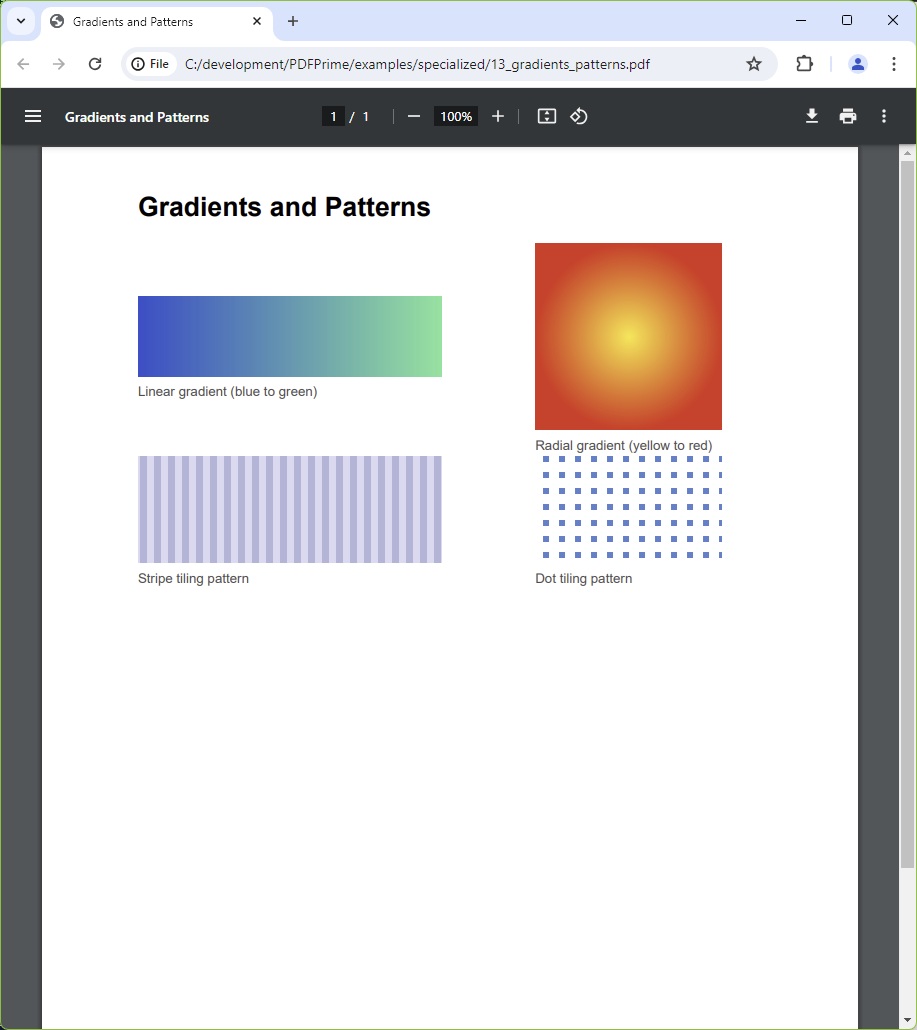
You should see a bold heading followed by four visual samples arranged in two rows: a wide rectangle shading from deep blue to bright green (linear gradient) beside a circle fading from warm yellow at the centre to red at the edge (radial gradient); below that, a purple-toned vertical stripe tile pattern beside a white field dotted with blue squares (dot tile). Each sample has a small descriptive label beneath it.
File: 13_gradients_patterns.pdf