🔒 Encryption
Password-protected PDFs with AES-256 encryption and granular permission control.
Encrypted PDF
using ObviousPDF;
using ObviousPDF.Accessibility;
using ObviousPDF.Fonts;

var doc = new PdfDocument();
doc.Info.Title = "Encrypted Document";
doc.Language = "en-US";
doc.DisplayDocTitle = true;

doc.Encryption = new PdfEncryption
{
    UserPassword = "",
    OwnerPassword = "AdminPass123",
    Algorithm = PdfEncryptionAlgorithm.Aes256,
    AllowPrinting = true,
    AllowCopying = false,
    AllowModifying = false,
    AllowAnnotating = true
};

var root = doc.EnableTaggedPdf();
var page = doc.AddPage();

var h1 = root.AddChild(StructureType.H1);
page.AddTaggedText(h1, "Encrypted Document", 72, 740,
    new PdfTextOptions { Font = StandardFont.HelveticaBold, FontSize = 20 });

var p = root.AddChild(StructureType.P);
page.AddTaggedTextBlock(p, new[]
{
    "This PDF is encrypted with AES-256.",
    "Anyone can open it (empty user password).",
    "Copying and modifying are restricted.",
    "The owner password 'AdminPass123' grants full access."
}, 72, 700, new PdfTextOptions { FontSize = 12, Leading = 18 });

doc.Save("encrypted.pdf");
Imports ObviousPDF
Imports ObviousPDF.Accessibility
Imports ObviousPDF.Fonts
Dim doc As New PdfDocument()
doc.Info.Title = "Encrypted Document"
doc.Language = "en-US"
doc.DisplayDocTitle = True
doc.Encryption = New PdfEncryption With {
.UserPassword = "",
.OwnerPassword = "AdminPass123",
.Algorithm = PdfEncryptionAlgorithm.Aes256,
.AllowPrinting = True,
.AllowCopying = False,
.AllowModifying = False,
.AllowAnnotating = True
}
Dim root = doc.EnableTaggedPdf()
Dim page = doc.AddPage()
Dim h1 = root.AddChild(StructureType.H1)
page.AddTaggedText(h1, "Encrypted Document", 72, 740,
New PdfTextOptions With { .Font = StandardFont.HelveticaBold, .FontSize = 20 })
Dim p = root.AddChild(StructureType.P)
page.AddTaggedTextBlock(p, New String() {
"This PDF is encrypted with AES-256.",
"Anyone can open it (empty user password).",
"Copying and modifying are restricted.",
"The owner password 'AdminPass123' grants full access."
}, 72, 700, New PdfTextOptions With { .FontSize = 12, .Leading = 18 })
doc.Save("encrypted.pdf")open ObviousPDF
open ObviousPDF.Accessibility
open ObviousPDF.Fonts
let doc = PdfDocument()
doc.Info.Title <- "Encrypted Document"
doc.Language <- "en-US"
doc.DisplayDocTitle <- true
let enc = PdfEncryption()
enc.UserPassword <- ""
enc.OwnerPassword <- "AdminPass123"
enc.Algorithm <- PdfEncryptionAlgorithm.Aes256
enc.AllowPrinting <- true
enc.AllowCopying <- false
enc.AllowModifying <- false
enc.AllowAnnotating <- true
doc.Encryption <- enc
let root = doc.EnableTaggedPdf()
let page = doc.AddPage()
let h1 = root.AddChild(StructureType.H1)
page.AddTaggedText(h1, "Encrypted Document", 72.0, 740.0,
PdfTextOptions(Font = StandardFont.HelveticaBold, FontSize = 20.0))
let p = root.AddChild(StructureType.P)
page.AddTaggedTextBlock(p, [|
"This PDF is encrypted with AES-256."
"Anyone can open it (empty user password)."
"Copying and modifying are restricted."
"The owner password 'AdminPass123' grants full access."
|], 72.0, 700.0, PdfTextOptions(FontSize = 12.0, Leading = 18.0))
doc.Save("encrypted.pdf")Add-Type -Path "ObviousPDF.dll"
$doc = [ObviousPDF.PdfDocument]::new()
$doc.Info.Title = "Encrypted Document"
$doc.Language = "en-US"
$doc.DisplayDocTitle = $true
$page = $doc.AddPage()
$page.AddText("This document is encrypted.", 72, 720)
$enc = [ObviousPDF.PdfEncryption]::new()
$enc.UserPassword = ""
$enc.OwnerPassword = "AdminPass123"
$enc.Algorithm = [ObviousPDF.PdfEncryptionAlgorithm]::Aes256
$enc.AllowPrinting = $true
$enc.AllowCopying = $false
$enc.AllowModifying = $false
$enc.AllowAnnotating = $true
$doc.Encryption = $enc
$doc.Save("c:\temp\encrypted.pdf")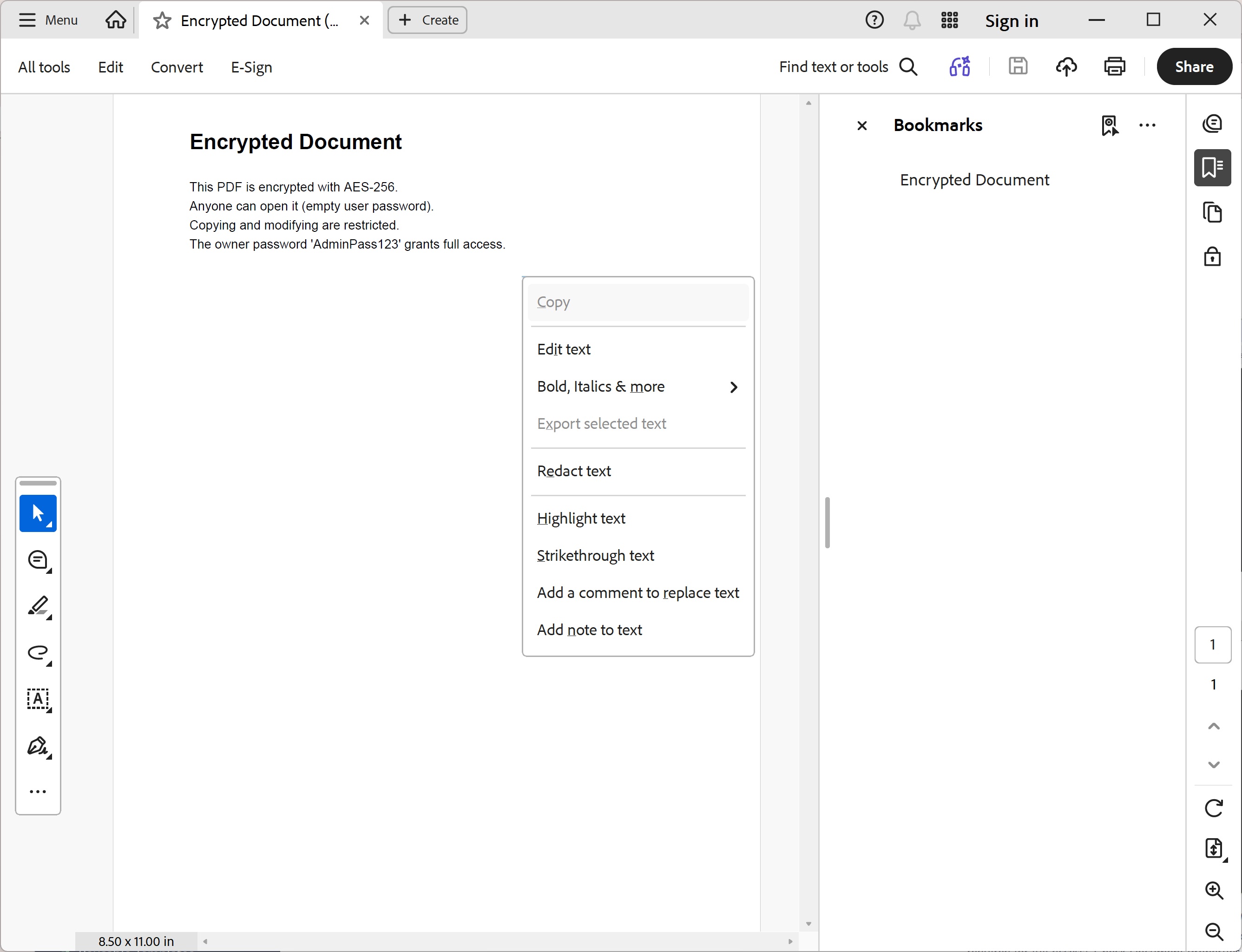
You should see an "Encrypted Document" heading and a four-line paragraph describing the AES-256 settings (open without a password; copying and modifying restricted; owner password required for full access). Check Document Properties → Security in your viewer to confirm the permissions and encryption algorithm.
File: 11_encryption.pdf
Encryption Options
| Property | Description |
|---|---|
Algorithm | Aes128 or Aes256 |
UserPassword | Password to open the PDF (empty = no password needed) |
OwnerPassword | Password for full access (change permissions, etc.) |
AllowPrinting | Allow readers to print |
AllowCopying | Allow copy/paste of text |
AllowModifying | Allow document editing |
AllowAnnotating | Allow adding comments |